CATEGORY PAGE (RESOURCES)What’s New on Facebook?

New features to Facebook Live
Facebook released some important updates earlier this year for Facebook Live to give more customisation options and tools for publishers.
- Going Live from Web
People can now go Live on Facebook through a web browser. Previously the Live videos were only recorded on mobile but now you can create content on laptops and desktops. - Live Contributor for Pages
Admins can now assign ‘Live Contributor’ to use Live feature from a Page. Previously, only admins could go Live but with this update, other people can now go Live. For example, an admin can assign a fan of their page to be a ‘Live Contributor’ who can then shoot Live video for this Page. - Insights Updated for Video
Profiles with over 5,000 followers will soon have the video metrics to give improved insight on their video performance. The metrics include total minutes viewed and total engagement. - Live Comment Pinning
Broadcasters can now pin comments to the bottom of a live broadcast. This update encourages publishers to highlight specific comments for their viewers to see. - Video Permalink for Pages
Facebook is rolling out a permalink which directs people to the Page’s video content. It will be accessible via facebook.com/pagename/videos. People who visit the link will be shown a live video if there is a Facebook Live video underway, as well as a library of the Page’s previous live and non-live videos. - Cross-posting of Previously Live Videos
After a publisher has finished recording a Facebook Live video, they can post the video to multiple Pages at the same time.
New Ways to Watch Facebook Video
Facebook announced in February 2017 that they are focused on continuously improving the video experience. Here are some of their latest they hope will make watching video on Facebook richer, more engaging and more flexible.
- Sound to videos in News Feed
Facebook is rolling out automatic sound to play videos in the News Feed. If the phone is on sound, the videos will play with sound. Sound fades in and out as you scroll through videos in News Feed. - Vertical Video
Larger preview of vertical videos in News Feed is now available to everyone watching videos on iOS and Android. You’ll start seeing vertical videos with a 2:3 aspect ratio (as opposed to 1:1) on your News Feed without having to expand them. - Watch and Scroll
It’s now possible to minimise the video you’re watching in News Feed to a picture-in-picture view in the corner of your mobile screen while you scroll down the News Feed to check other stories. - Facebook Video App for TV
New Facebook video app has been announced for TV. The video app for TV helps you to enjoy Facebook videos on a bigger screen. The app will roll out to app stores for Apple TV, Amazon Fire TV and Samsung Smart TV, with more platforms to come.
Want to get traction with your social media posts, email marketing and more? We have created this optimal character length guide for Facebook, Twitter, Hashtags, Domains and subject lines to help you get more engagement.

Posts with 40 characters receive 86% more engagement than posts with a higher character count

Tweets shorter than 100 characters have a 17% higher engagement rate

HASHTAGS
Don’t use spaces or special characters, don’t start with or only use numbers, and be careful with using slang

EMAIL SUBJECTS
Subject lines containing
28-39 characters get an open rate of 12.2% and click rate of 4% on average

DOMAIN NAMES
The best domain names are short, easy to remember and spell, don’t contain hyphens or numbers, and have a top level extension

PARAGRAPHS
Opening paragraphs with larger fonts and fewer characters per line make it easier for the reader to focus and jump quickly from one line to the next
Facebook tried but failed to purchase Snapchat in 2013. It appears that the new line of attack is to copy.
After successfully copying Snapchat with Instagram Stories – 150 million use Instagram Stories every day, which roughly equals Snapchat’s total user base – Facebook is underway again on its head-to-head with Snapchat, by developing “Facebook Stories”.
Currently being tested in Ireland in the Facebook mobile app, a company spokesperson told Business Insider that Facebook plans to roll-out the “new format” to more countries in the coming months.
Facebook Stories works identically to Instagram Stories (and Snapchat Stories). You add photos and videos to your personal “story” for your friends to tap through, and everything you choose to share disappears after 24 hours. These won’t be shown in the News Feed or on your timeline, and like Instagram and Snapchat, you can reply directly to someone’s story with a direct message. You can also add selfie filters and Facebook’s version of Snapchat geofilters to photos and videos.
Here are some of the latest statistics and facts on LinkedIn.
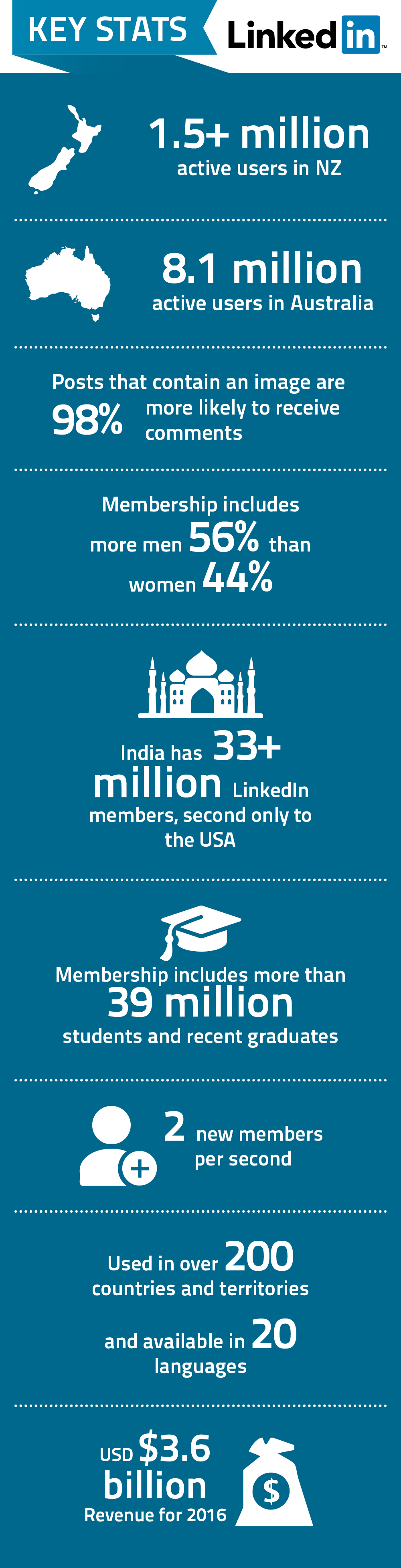
You might also like to check out the latest statistics on Facebook, Youtube and Twitter
Here are some of the latest statistics and facts on Facebook.
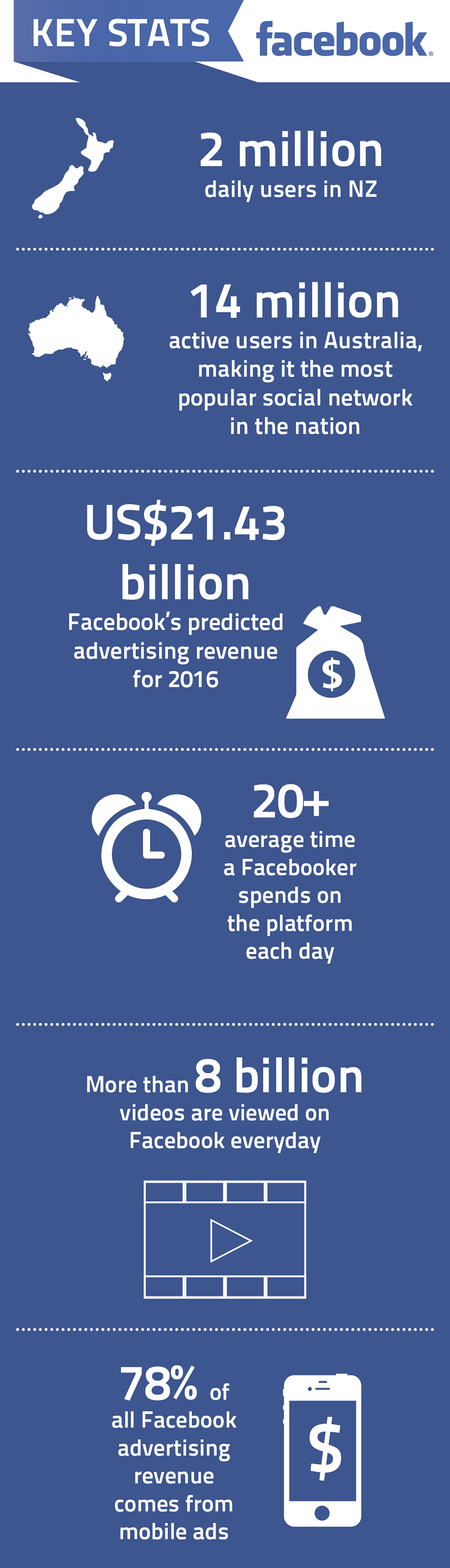
You might also like to check out the latest statistics on Youtube, LinkedIn and Twitter
Here are some of the latest statistics and facts on Youtube.
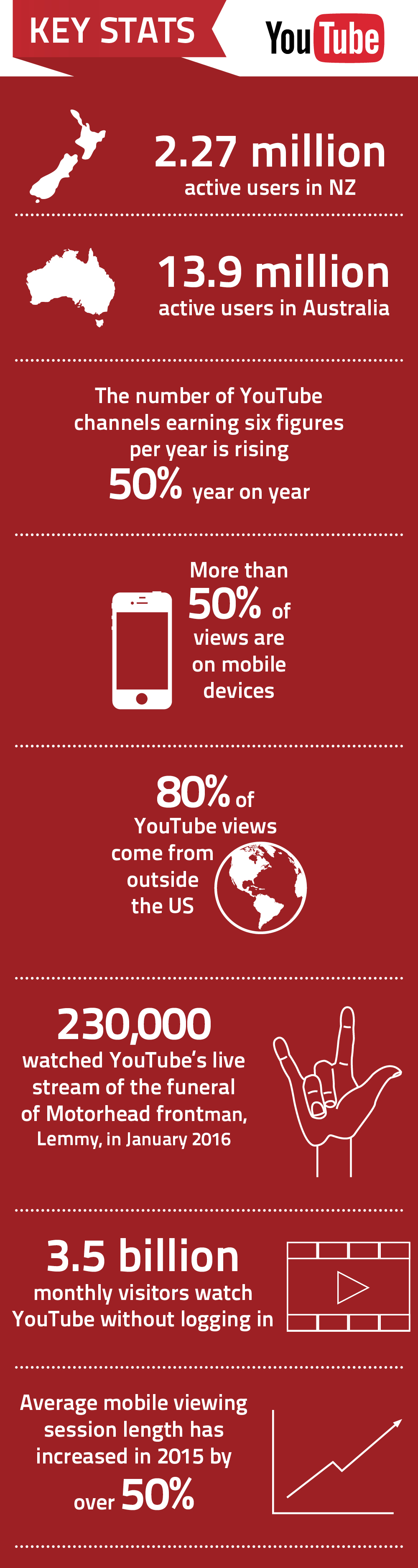
You might also like to check out the latest statistics on Facebook, LinkedIn and Twitter
Twitter was created in March 2006 by Jack Dorsey, Evan Williams, Biz Stone, and Noah Glass and launched in July 2006
On 15 January 2009, a US Airways flight crashed on NYC’s Hudson River. A photo posted to Twitter broke the news before traditional media, highlighting Twitter’s role in breaking news. Here are some other interesting statistics and facts on Twitter in our infographic.
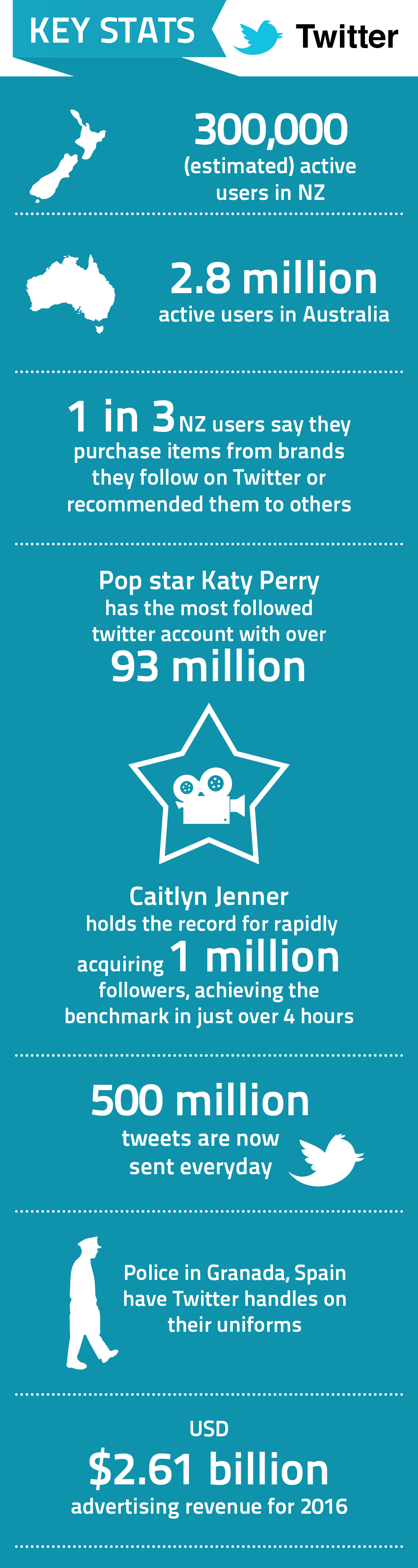
You might also like to check out the latest statistics on Facebook, LinkedIn and Youtube
If you’ve been on Facebook recently, you may have noticed the bold new design changes in the Pages layout. Overall, the new appearance is more user-friendly and customisable for the business.
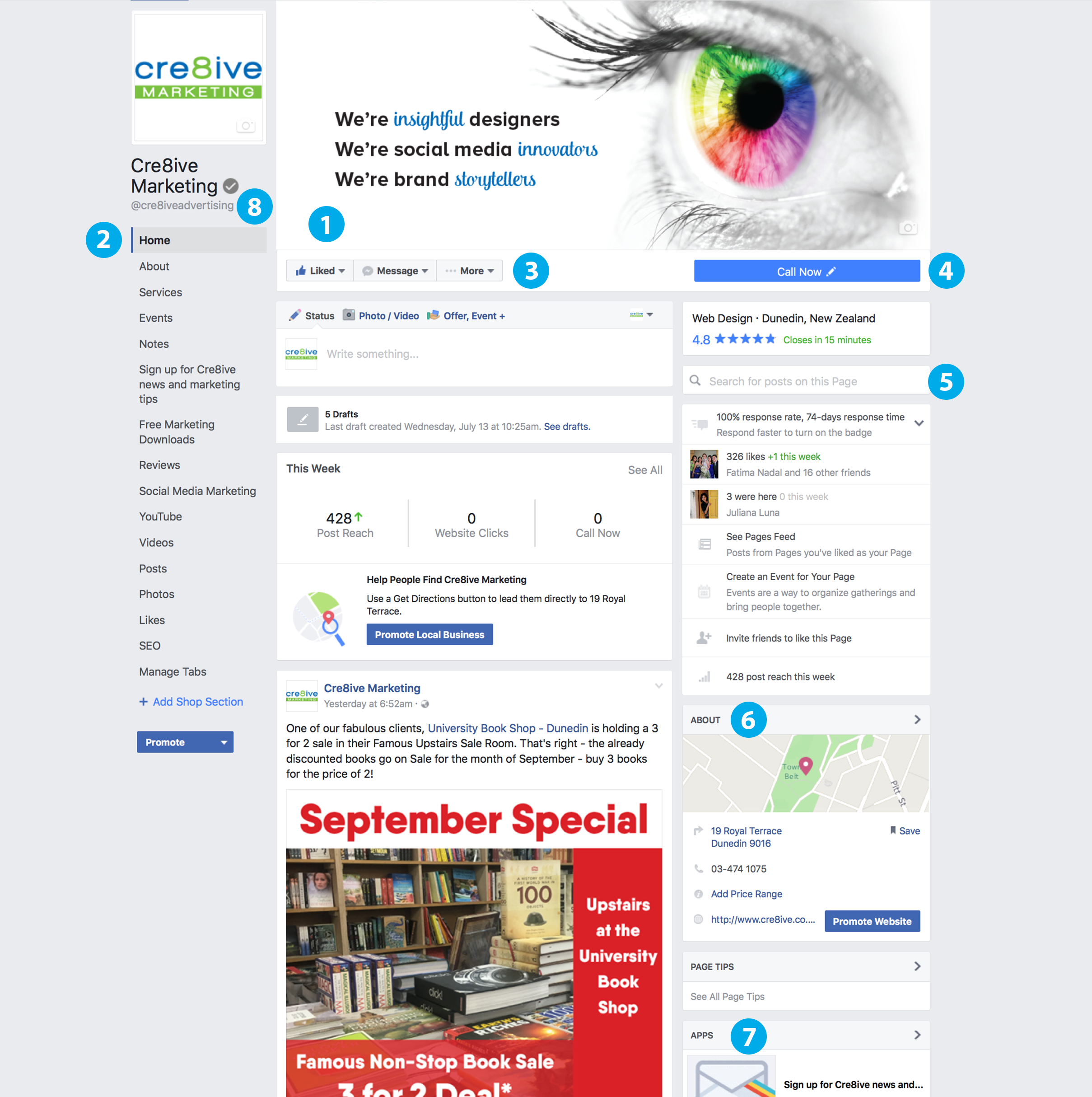
Here are the changes you need to know about the new Facebook layout:
- Visible area increased on cover photo
The most prominent and exciting change we think is on Facebook’s new Page layout is that Facebook has moved the profile picture and business name off the cover image region to the left-hand column, increasing the ‘action’ area. Make sure you take advantage of this new size.
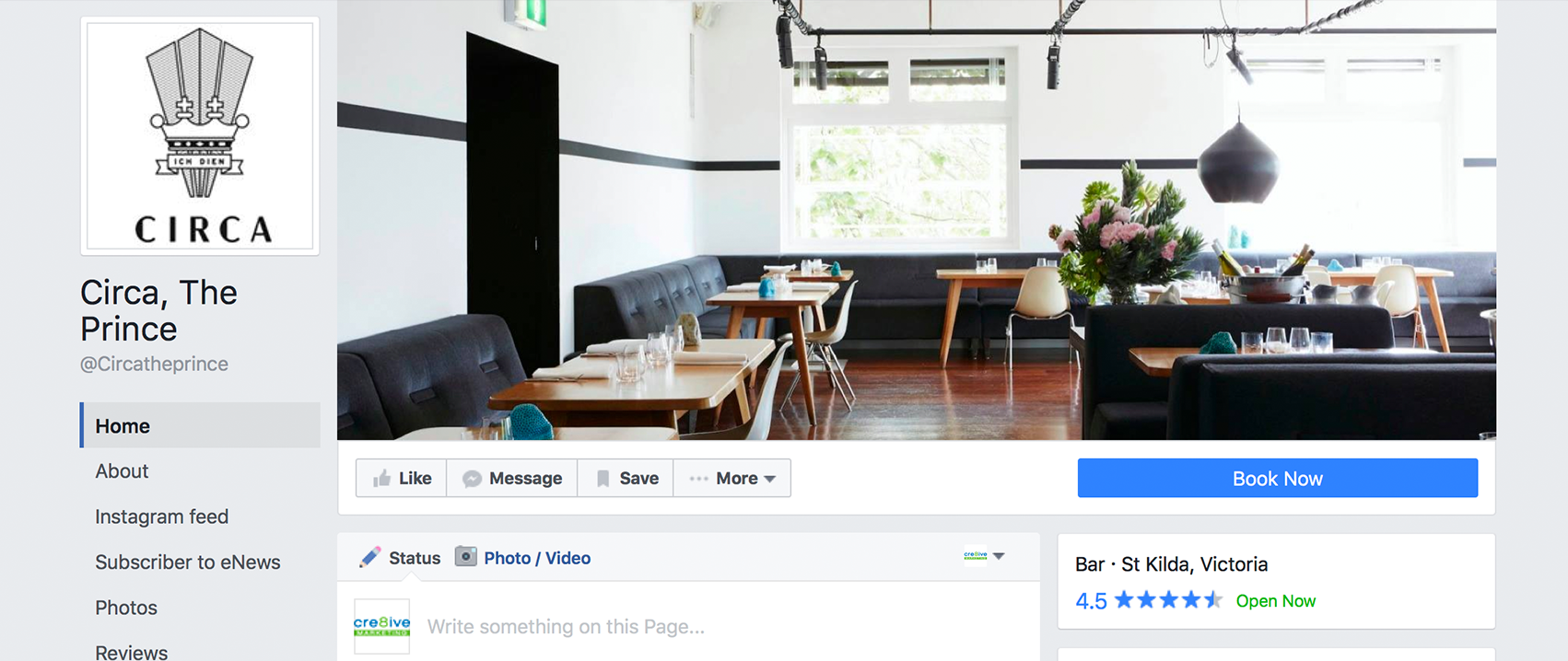

- More visible Page Tabs
The More Tab has been removed and the Page Tabs now appear below the profile picture with every single tab listed. This may seem a little overwhelming to your audience so we recommend removing the ones that aren’t necessary. - Interaction buttons have moved
The Message and Share buttons have moved from the corner of your cover photo under the ellipsis and next to the Like Button to the space underneath the cover image; giving your audience one convenient location to interact with your Facebook Page. - Call-to-Action button is bigger and has moved
Another significant change is the Call-to-Action button which is now a long blue strip under the cover photo. The button is also customisable to how you want your audience to reach out to you. Rather than just having the option to contact, the public can now go straight to an app, make a reservation, shop, watch a video or more with just a click of a button. - The new search bar allows you to search for posts on a Page
- The About section has moved to the right-hand column
- Your most important apps appear on the right, with images.
With the long list of tabs and apps on the left, Facebook has used the right column to showcase your most prominent ones. - The addition of @[username]
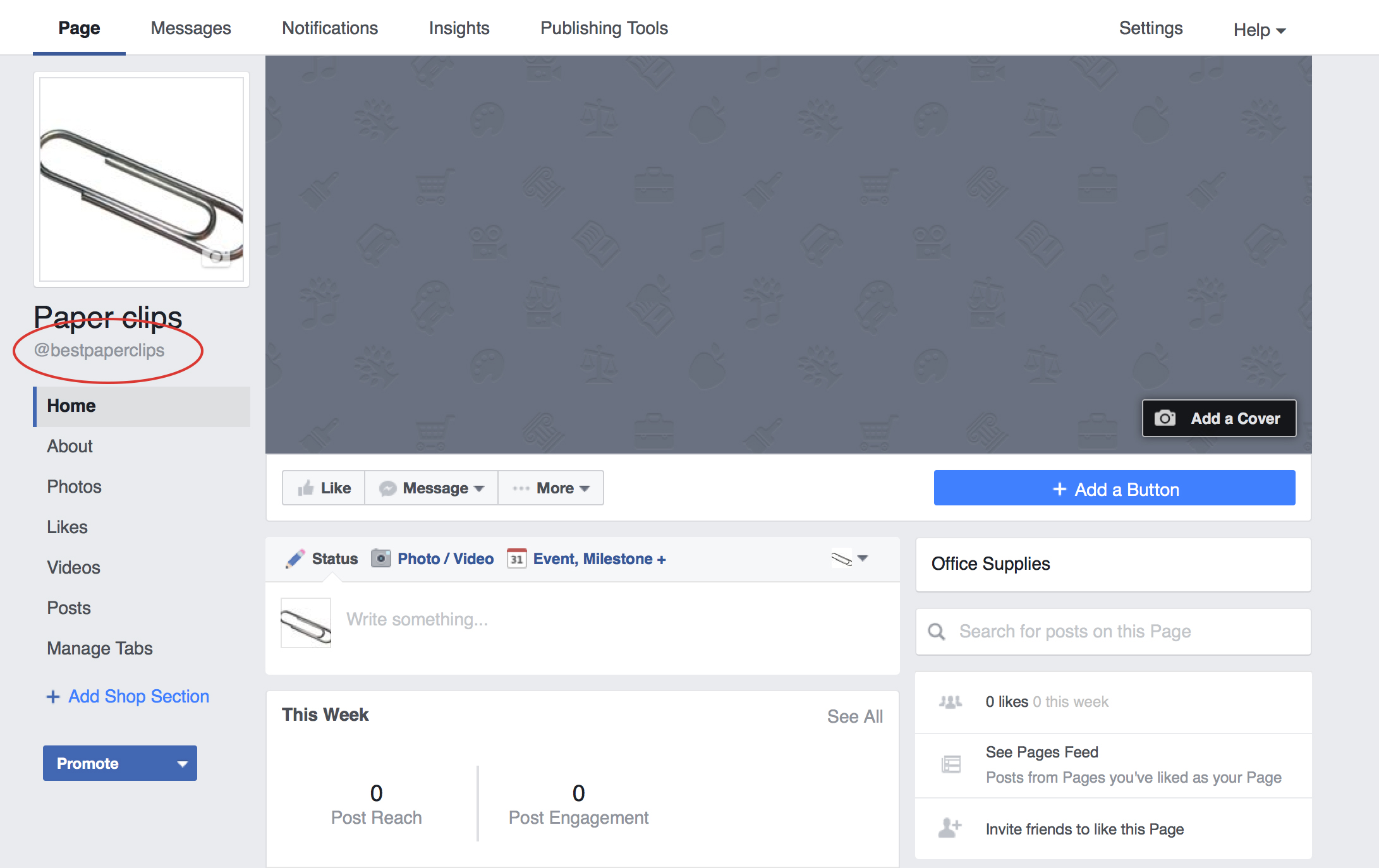
Below the name of your business you will find an @ symbol followed by your Facebook username. This handy addition tells your audience how they can search for you on Facebook or tag you in a post. Learn how you can customise your Facebook username here.
There’s also a few not-so-apparent changes. Notably, your Page’s profile picture will display at 160×160 pixels on computers and 128×128 pixels on smartphones. Additionally, your Page’s cover photo displays at 828 x 315 pixels on computers, 640 x 360 pixels on smartphones and will load fastest as a JPG file that’s 851 x 315 pixels and less than 100 kilobytes. However, for profile pictures and cover photos with your logo or text, you may get a clearer and better photo by using a PNG file.
Keep an eye out for Cre8ive’s insights for more social media sneak peeks and updates.
If you created your Facebook Page few years ago, you would have gotten a hard-to-type link that looks something like this:

This is not ideal and should be updated to make it easier for users to find you. In addition, if you refer visitors to your Facebook page on printed material, consequently requiring them to type out each character of your URL to find you, a vanity URL will simplify the process.
There are several ways to change your Facebook URL.
Go to http://www.Facebook.com/username to set your vanity URL. It will take you to a page that looks like this where you can select the page you want to edit and make the switch to a more attractive URL.
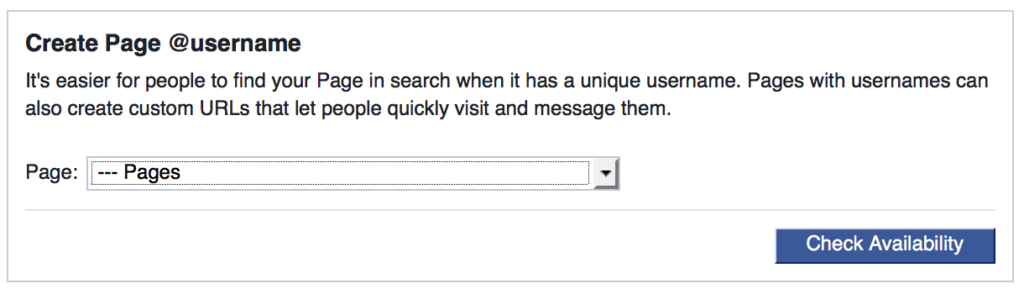
But be careful as you can very easily change the username of your Personal Profile to the one you wanted for your Fan Page. Also note that you can only change your Page’s username once, so make sure it’s the one you want. You may want to check on other social media platform that you are either on or considering creating a presence to ensure consistency in URLs between platforms.
Another way you can change your page’s URL is by going to the page and selecting Edit Page Info under the More tab. Here you can change the name, URL, category, description or contact information of your Page.
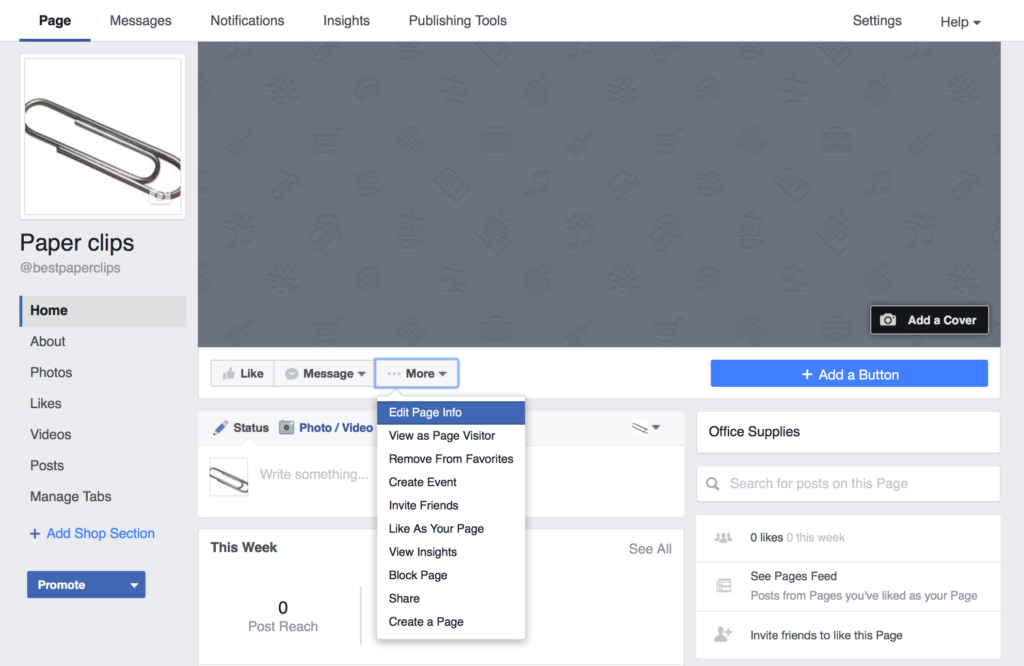
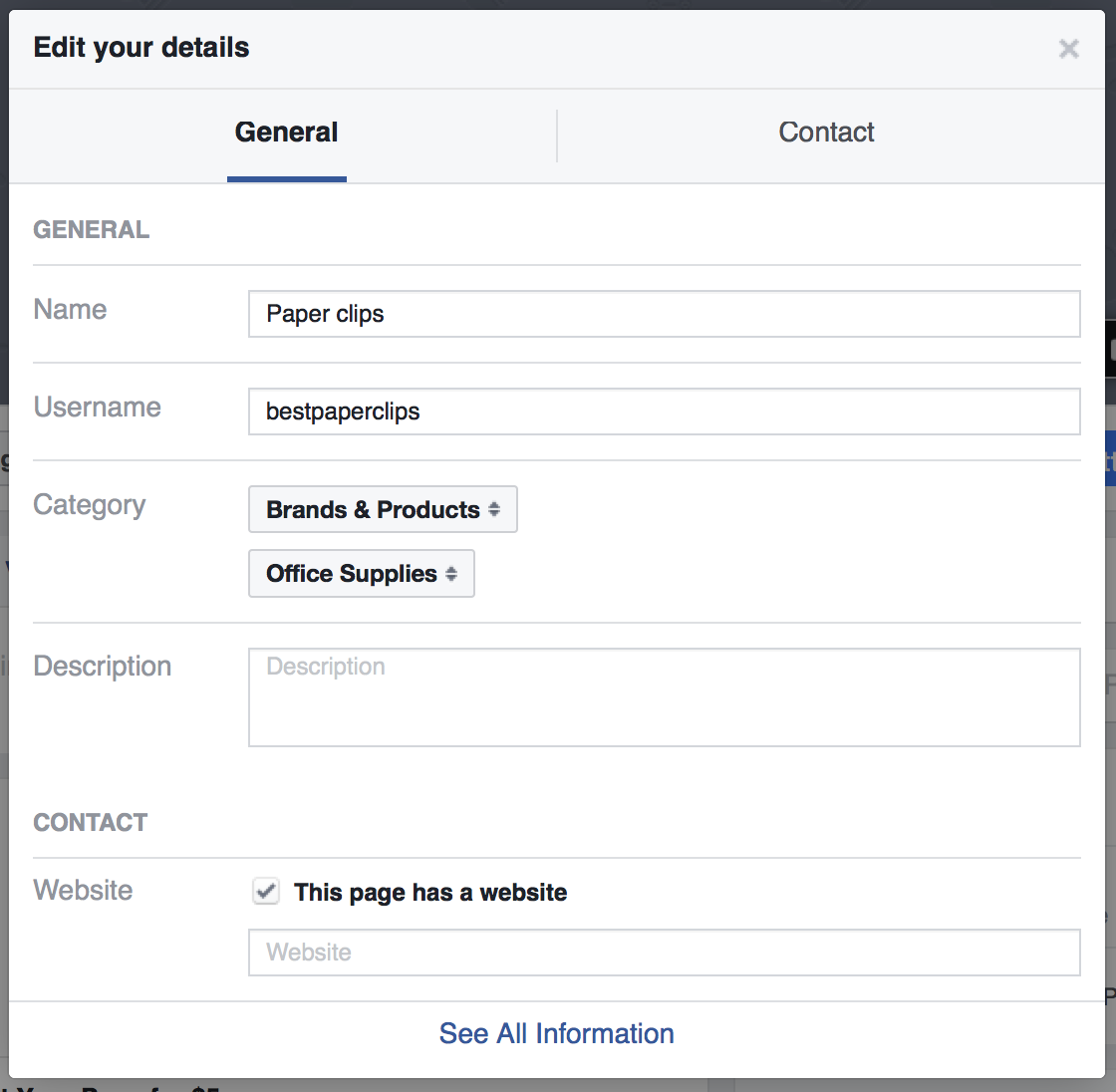
Within seconds you can take your page’s URL from this long URL
to this branded URL link

You will also see the username in the left hand column change as well. This means that people can now easily search or tag your page in a post by putting the @ symbol before the name of your page.
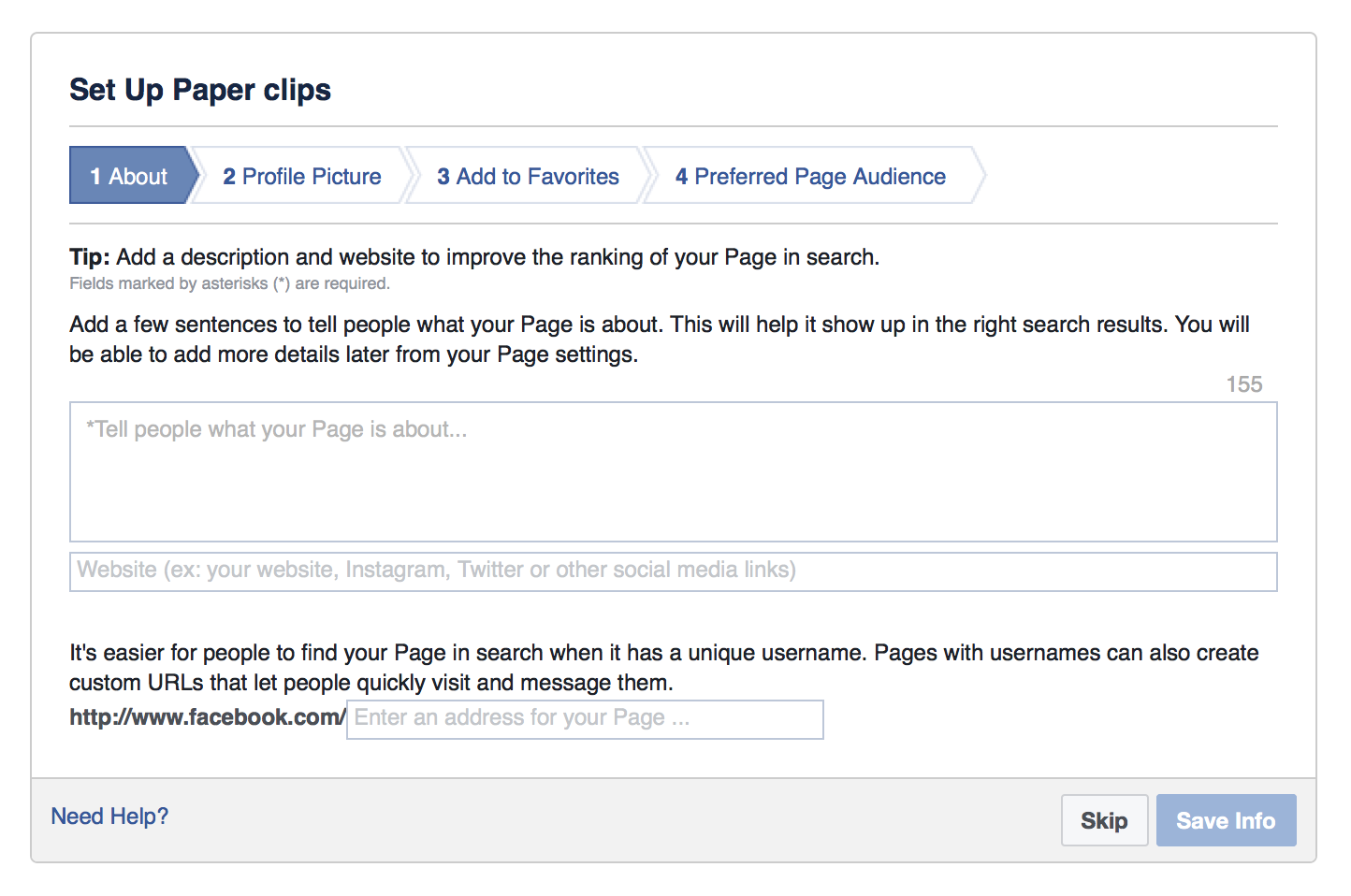
If you are starting a Fan Page the process is even simpler. After choosing your page type and category, a box will immediately pop up where you can set your page’s custom URL.
Given how easy it is to claim your Facebook Page’s URL, there is no excuse not to make the change.
Extension of the ‘Non-profits’ Tool on Facebook
Facebook for non-profits was launched in November 2015, a resource designed to help non-profits better communicate their story on the social network. Now Facebook is rolling out the ability for people to fund raise on behalf of non-profit organisations. This user-focused tool is an extension of the tool launched last year and can be used for fundraising and volunteer efforts that combine an online and offline component.
The Alzheimer’s Association successfully used Facebook as part of their campaign to promote their ‘Walk to End Alzheimer’s’ event, designed to raise awareness and funds for Alzheimer’s care, support and research. The Facebook campaign aimed to recruit participants for the walk, as well as fundraising for the organisation. Part of their success was driven by using a personal approach and encouraging participants to share their stories and selfies.
With this new tool, anyone on Facebook will be able to create a page to raise money for US-based non-profit organisations and non-profits can also organise users to raise funds on their behalf. Amongst those who have joined so far includes Unicef, the Malala Fund and Oxfam.
Less Clicks to Donate
Friends can donate in a few taps without leaving Facebook making it easier to collect donations.
Find New Supporters Easily
Each time someone donates they are prompted to share and invite their friends. Shares and re-shares also contain a donate button making it easy to donate right from News Feed.
Fundraising has had past success on Facebook. In 2014 the Ice Bucket Challenge raised US$115 million for ALS research. (to find effective treatments and a cure for Lou Gehrig’s Disease.)
At first, only a small amount of users can (around 1%) can access the feature, however a wider roll out is expected for US users in the following weeks. Presumably if this tool works well, Facebook will roll it out to other countries including New Zealand.