CATEGORY PAGE (RESOURCES)The Benefits of In-house Social Media Training
Changing algorithms, new ad options, new functionalities – the constant changes in the social media landscape can be hard to stay on top of, and causes headaches for many organisations.
In a survey by Sensai, 
of respondents shared that managing social media channels is harder than filling out income tax paperwork.
The top 6 social media marketing challenges we see for businesses
- Facebook algorithm changes
- Rising ad costs
- Getting noticed in overcrowded feeds
- Too many trends/changes to keep up with
- Not enough people and resources
- Not understanding how to measure results
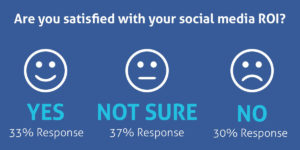
Source: Sensai
Benefits of Social Media Training
- No more ad-hoc social media activity
- Clear, strategic and measurable social media marketing
- Confidence that you are maximising your social media efforts
- Control your share of the conversation without letting your competitors dominate
- Boost staff motivation and morale by developing their skills and knowledge in Social Media
Have you considered Bespoke in-house social media training tailored to meet the requirements of your organisation?
We want to help you become self-sufficient with social media. If you train with us, we’ll give you the confidence, knowledge and practical skills you need to grow. Investing in social media training now will ensure your business does not get left behind.
From building a strategy to what to post and how to analyse results, this training will help you to find new clients, provide support and interact positively with existing and potential customers.
We deliver in-depth courses which give you a blend of best practice, strategy, practical exercises, guides, planning, discussion and Q&A.
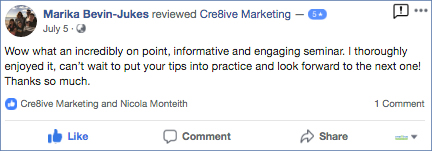
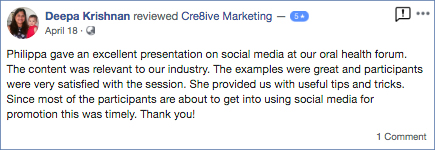
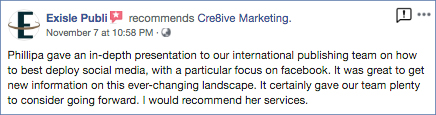
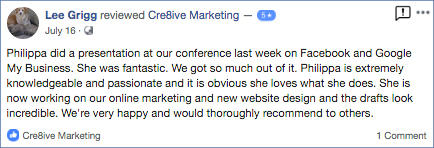
We offer in-house training and workshops and Philippa is often engaged as a keynote speaker. Here is some of our feedback.

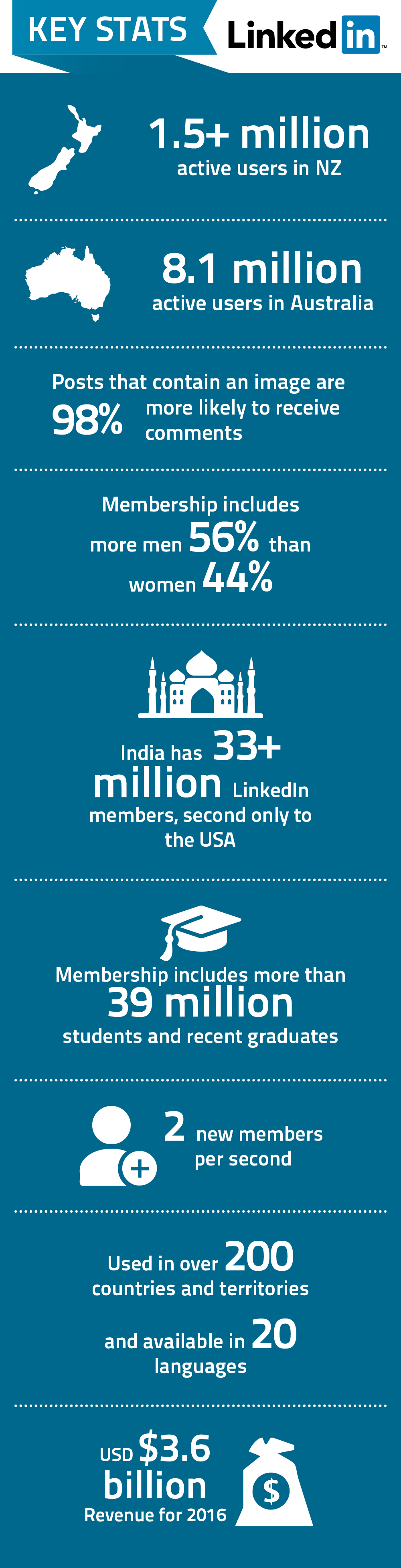
Here are some of the latest statistics and facts on LinkedIn.
You might also like to check out the latest statistics on Facebook, Youtube and Twitter
Social media is a dynamic persuader of customer perception and a fundamental communication channel. However, it can also be an unruly place that you must be constantly prepared for. At the heart of any social media communication is your brand and it needs safe guarding online just as you would other places.
With over 1.6 billion users on Facebook alone, the potential for social media being incredibly creative or destructive for your business cannot be understated. Having a social media presence and understanding how to deal with the associated problems, is not an option.
Standard public relation rules and guidelines do not apply to the unique problems and crisis that can arise. Developing and implementing a crisis plan specific to social media is critical for an organisation of any size. Here are 8 key steps to consider when developing a social media crisis plan:
- Create a social media policy for your staff
A strong social media policy is your first defence against a crisis. It will help guide your organisation and staff in managing crisis on your various social media channels. - Map it out
Work out your plan of attack. Aside from delegation, how will you deal with trolls, upset customers, misinformation and other problematic media content. Consider creating a visual guide as well which could be easier for staff managing the crisis. - Respond like lightening
In the social media world, a minute late could be hundreds of comments late. Use web-tools such as Social Mention to keep abreast of breaking news and business reports. Often the web will know about a potential crisis for your business before you do.
Pre-empt a crisis if possible. This sends a message that the company feels strongly about its responsibility to the consumer and its ability to weather the storm. - Respond to the customer consistently and regularly
Use the techniques and response protocols outlined in your crisis plan to respond consistently and regularly. Unhappy customers who are ignored are lost and will spread the word. - Be Real
Part of your protocols should be to create genuine statements that address common issues and comments. Disingenuous, standardised PR sound bytes will lose you support. - Use a megaphone
Let your customers and business associates know your position, through as many media channels as you can. Being proactive in taking responsibility will show general care. - Track your crisis
Watch how the crisis is developing. Carefully go through comments to assess the atmosphere. Make sure to cover other sites for conversations you may need to respond to. - Post crisis discussion
Review the event’s issues and advantages with your social media team and what you could do better the next time. Use this discussion to create a generalised plan adaptable to a variety of crisis.
We have all heard the quotation “it’s not what you know, it’s who you know.” So how do we go about meeting new people and building contacts – in other words, how do we develop a network? Attending functions and utilising social media to hasten your networking opportunities, you can create potential opportunities.
LinkedIn is the world’s largest professional networking platform. It has grown from 58 million members in 2011 to over 200 million members in March 2013. More than 12,000 organisations have registered with LinkedIn and more than five billion searches on the internet were related to LinkedIn. This platform allows numerous opportunities to connect with potential employees, employers, business partners, suppliers and clients. Whether you are looking to return to the workforce after a break with children, wanting to profile the people behind your business or wanting to increase your business internet presence, it is highly recommended that you get on board. The beauty of LinkedIn is that maintaining a profile doesn’t need to be as time intensive as other social networking sites. However, it is not enough just to create a LinkedIn profile – you need to maximise your profile.
LinkedIn provided the following data:
- As your professional network grows, so do your career opportunities
- Job seekers who grow their networks are 30% more likely to find jobs than other job seekers whose networks remained static
An Effective Profile
LinkedIn suggests that having a completed profile provides you with a 40% greater chance for networking success. A completed profile is the most effective way to showcase your skills, background, experience, interests and areas of expertise. With your foundation in place you will be well positioned for the next phase, where you can grow your business or personal profile for networking.
Some key tips when creating your LinkedIn profile:
1. Upload a Professional Photo
Make a good first impression as this gives you the best opportunity to attract new connections.
2. Create a Compelling Headline
With only 120 characters, use descriptive and compelling keywords to capture the attention of professionals.
3. List your Current Position and at Least Two Previous Positions
4. Give Recommendations First
Recommendations from a LinkedIn member who has used your products/services can be displayed on your profile and these are an effective way to build credibility and trust. A good way to obtain recommendations is to provide them first. You need at least three in order for LinkedIn to label your profile complete.
5. Complete the Interests, Groups and Associations Sections
Each of these terms will be hyper-linked and will take you to other users in the network who share these interests.
Optimising Your Profile
1. Edit your LinkedIn URL
Customise your URL so your profile will be optimised to show in search results. Ideally, you want it to be your name or the closest possible match. For example, this is my LinkedIn URL www.nz.linkedin.com/in/philippacrick/
2. Customise your Website Listings
You can add 3 links to other sites – such as your website and other social media profiles. It’s a great opportunity to market your business and create valuable back links. You have the option of choosing the anchor text – select ‘other’ and use your name or company name with some additional keywords to boost your SEO.
3. Make your LinkedIn Profile Publicly Visible to Everyone
You want other LinkedIn professionals to find you easily. Being invisible or private will not help build your network or attract opportunities.
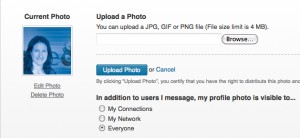
LinkedIn profile visible to everyone
4. Join Groups
You’re allowed up to 50 groups on LinkedIn. Join as many as you can. Groups are how you get things done on LinkedIn. By joining groups people can get to know you and your business. Try to post relevant discussions on a regular basis but not of a direct selling nature. Post articles, events, requests for advice and suggest discussions about topics relevant to the group.
5. Participate in Threads
If you’re just a ‘poster’ and not a participant, it will appear that you are in it to promote yourself, rather than a participating member of the LinkedIn community.
Lastly, connect with everyone! You never know where an opportunity can come from. Start adding your LinkedIn link to your email signature, on other social networking sites, on your business cards and other marketing material.
Use this social network to gain exposure, credibility, to maintain contact and connect with other professionals who may otherwise be beyond your reach. In addition, you can seek advice; research companies; track the health of an industry (or company); check out potential clients and employees. There are also Search Engine Optimisation benefits that increase the search engine results of your website.
This is a brief overview on how to maximise your LinkedIn profile. There is a wealth of free information on the internet that can assist to further capitalise on this marketing tool, not only for a personal profile but a company profile as well.