CATEGORY PAGE (RESOURCES)9 Tips to Increase Instagram Engagement
Tips to Increase Instagram Engagement
The Instagram platform makes use of a constantly evolving algorithm to dictate the order of posts that users see in their feeds. Instagram’s algorithm aims to predict what posts you want to see and the content you care about. The algorithm takes into account several key factors when prioritising content in user feeds; engagement is perhaps the most important part of the algorithm. But what characterises engagement and how is it measured? An even better question is how do you increase engagement on your Instagram?
For engagement purposes, you should focus on several defining metrics:
Views and impressions
Views and impressions are the total number of times your post (whether photo or video) has been seen. They can come from a user seeing your post on their feed, directly on your profile, or the Explore page.
- Likes
Likes are Instagram’s simplest form of measuring engagement. They serve as a good quantitative measure of how ‘likeable’ your content is. Though likes are not the deepest form of engagement, they still represent the baseline popularity of your post.
- Comments
Similar to likes, comments are a quantitative measure of engagement but are a much more valuable form because they are much deeper than a simple double-tap. To comment on a post means users are highly engaged with your content because they took to respond or say something about it.
- Shares and reposts
Shares and reposts essentially act as organic advertisements of your brand or content. This form of engagement goes even deeper than a comment. A share or repost indicates that users are willing to be associated with you and your brand.
While these are the primary measure of engagement, it is also important to keep tabs on interactions, which are the total number of actions taken on your profile such as visits, clicks, and contact.
Now that you know the metrics that measure engagement, here are some tips to improve your profile’s engagement:
9 Powerful Tips to Boost Your Instagram Engagement
- Create quality content. It is no secret that Instagram is a visual sharing social media platform. Creating visually appealing posts is essential to getting users to stop scrolling through their feed long enough to really engage with your post. Take the time to create visuals that stand out. Rather than focusing on posting products, try sharing experiences or telling stories that draw people in and gives them a reason to double-tap.
- Be consistent. Now that you are creating quality content, it is important to establish and maintain a consistent posting schedule. Posting regularly is a good way to build a loyal following on Instagram allowing followers to build a relationship with your brand and get into a habit of engaging with your content.
- Know the best times to post. Knowing when to post ensures your audience is actually seeing your content, which is key to getting high engagement on your posts. You can track previous post engagement and manually using a combination of Instagram Insights, data monitoring, and testing different posting times or there are a variety of different apps and tools available that do all the calculations for you. Either way you do it, it is important to know when your target audience is online so your posts are fresh in their feeds.
- Establish a ‘look’ to your posts and overall profile. Give your posts a distinct filter and establish a colour scheme. Establishing a defining look and sticking to it gives followers the opportunity to recognise your posts on their feed and gives your profile an identity.
- Regularly post stories and make use of sticker features. Stories may only last for 24 hours, but they are a great way of increasing engagement. Stories can be used to draw attention to new posts and encouraging viewers to check out your profile. Using Story stickers is also a great way to start conversations about your brand. Use the question sticker to let your followers get to you or get more information about your brand. Poll and vote stickers can be used to understand and gauge followers’ opinions regarding your products or services.
- Use hashtags. Instagram allows you to use up to 30 hashtags per post and you should make use of this feature; 30 hashtags might be excessive but using a good number of hashtags can increase the reach of your post. Create a basic branded hashtag that should be applied to any post and can be used by followers to share user-generated content associated with your brand. Branded hashtags can also be used for product launches, promotions, and special events. Long-tail hashtags are detailed hashtags that can also be used to reflect the content of your post. Long-tailed hashtags are better to use than simple hashtags because there are fewer associated posts to compete with and you are more likely to be discovered.
- Include locations. Adding a location to every post boosts exposure, which in turn leads to higher engagement. By using a location tag, your post appears in that locations’ recent associated posts. Users that search for posts in your area will likely come across your post.
- Mention and tag other accounts . If your post features a person or another brand, tag them! Not only will they be notified of the post which will drive them to your page, but it also gives them the ability to repost or share your content. Mentioning other accounts increases exposure and builds relationships with other accounts and users.
- Reply to direct messages (DMs) and comments. Remember that building a relationship and brand loyalty are important when it comes to engagement. Instagram is all about community so encourage conversation and then make sure you reply to it. Make sure you take the time to listen and respond to other accounts reaching out to you.
Creating consistent and quality content, analysing your insights and engaging with other social media accounts are some of the most important steps to increasing your Instagram engagement. Follow these steps to work in harmony with Instagram’s algorithm and watch your likes, followers, shares and engagement increase!
In March 2016, the powers that be at Instagram decided to implement an algorithm which they believed would help users with the exponential growth of photos and videos that were being shared, with the aim of helping organise content more effectively. They stated that users on average were missing 70% of their feeds.
“To improve your experience, your feed will soon be ordered to show the moments we believe you will care about the most.
The order of photos and videos in your feed will be based on the likelihood you’ll be interested in the content, your relationship with the person posting and the timeliness of the post. As we begin, we’re focusing on optimising the order — all the posts will still be there, just in a different order.”
The algorithm was meet with mixed reviews – mostly negative and some undesirable effects. A chronological feed requires little-to-no guesswork (all you have to worry about is posting when your audience is most active), algorithm-based feeds can be influenced by a variety of different factors, for example, how long people spend viewing your posts or the “genre” or type of content people engage with.
And while Instagram has continued to justify this change as a way to show people more content that they’re interested in, some have speculated a more calculated motive — that it’s a way to force mores businesses to boost their Instagram posts or implement instagram ads.
However, in March 2019 Instagram announced a makeover to the algorithm:
“Based on your feedback, we’re also making changes to ensure that newer posts are more likely to appear first in feed. With these changes, your feed will feel more fresh, and you won’t miss the moments you care about. So if your best friend shares a selfie from her vacation in Australia, it will be waiting for you when you wake up.”
The first change is the addition of “New Posts” button that allows users to manually refresh their feeds. This addition came as a result of users complaining that their feeds would refresh unexpectedly when scrolling.
Although the chronological feed is not back, the new change means that the very old content doesn’t constantly get bumped up in people’s feeds. It prioritises newer content.
The second change is much more important. According to the announcement, the new Instagram algorithm is now going to give more weight to when something is posted, and will prevent old posts from showing high up in your feed.
There are a number of facts that influence the algorithm, including how much engagement a post gets and how long people spend viewing a post.
With the recent change, Instagram has essentially shifted the importance (or weight) of these factors so that the time that people post has more influence on what appears on your feed.
As a result, if you want to have a work-around the Instagram algorithm in 2019, you need to optimise your posting time for when the majority of your followers are online.
It also means that businesses may need to post more frequently. Since older posts aren’t going to appear anymore, businesses will need to create fresh content more often in order to be seen on their followers’ feeds.
Other ideas on how to improve your Instagram engagement levels.
Changing algorithms, new ad options, new functionalities – the constant changes in the social media landscape can be hard to stay on top of, and causes headaches for many organisations.
In a survey by Sensai, 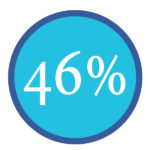
of respondents shared that managing social media channels is harder than filling out income tax paperwork.
The top 6 social media marketing challenges we see for businesses
- Facebook algorithm changes
- Rising ad costs
- Getting noticed in overcrowded feeds
- Too many trends/changes to keep up with
- Not enough people and resources
- Not understanding how to measure results
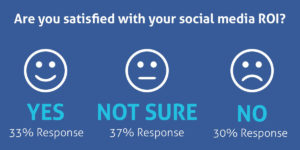
Source: Sensai
Benefits of Social Media Training
- No more ad-hoc social media activity
- Clear, strategic and measurable social media marketing
- Confidence that you are maximising your social media efforts
- Control your share of the conversation without letting your competitors dominate
- Boost staff motivation and morale by developing their skills and knowledge in Social Media
Have you considered Bespoke in-house social media training tailored to meet the requirements of your organisation?
We want to help you become self-sufficient with social media. If you train with us, we’ll give you the confidence, knowledge and practical skills you need to grow. Investing in social media training now will ensure your business does not get left behind.
From building a strategy to what to post and how to analyse results, this training will help you to find new clients, provide support and interact positively with existing and potential customers.
We deliver in-depth courses which give you a blend of best practice, strategy, practical exercises, guides, planning, discussion and Q&A.
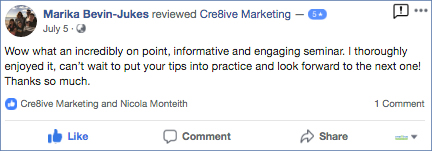
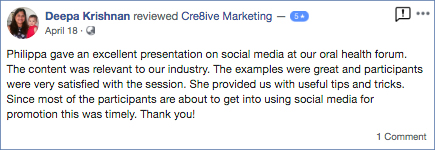
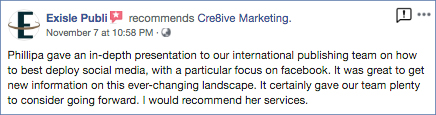
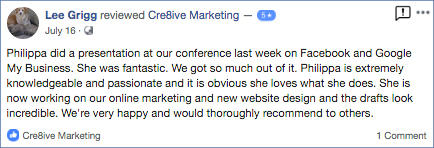
We offer in-house training and workshops and Philippa is often engaged as a keynote speaker. Here is some of our feedback.

Earlier in 2018, Instagram introduced an array of new tools and features. These tools have plenty of potential for businesses who are trying to stand out in their audience’s newsfeed. The following details the latest features on Instagram that can help promote your brand and engage more with your customers.
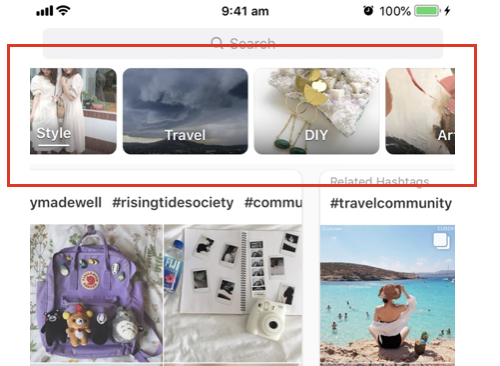
1. Instagram Topic Channels – these channels appear at the top of the ‘Explore’ section and show users different categories of posts eg. “For You”, “Art”, “Travel”. These will be collated, based on the user’s Instagram behaviour and interests. They offer a new great way to potentially connect with more members of your target audience who haven’t seen your brand yet.
These topic channels show hashtags relating to the topic so boost your posts with popular and relevant hashtags to get more reach out of your posts. If people are searching for these hashtags, then they potentially will be your target audience and see your post.
2. Video Chat in Direct Messaging – Similar to Facetime, you can video chat up to four people at one time, with all of them being on the same screen. You can also screen-share and show them what’s on your screen while you video chat.
Why Video Chat? This could be a great way to communicate with customers who have directly messaged you about concerns or a question. It’s helpful especially if you need to work through a screen to show them how to trouble shoot the exact problem they’re experiencing. It’s a faster and more convenient solution while achieving great customer service and hopefully exceeding customer expectations.
3. Add Music to Stories – choose music from Instagram’s music library to add to a Story. It contains a range of music, and you can choose a song through Mood, Genre or Popular. All music is free for commercial use.
Playing music can help enhance a certain mood of your Story or give it more impact.
Step 1: Tap on the smiley-face icon in the top right of the screen after you take a photo for the story. This will open up the page of stickers you can add to the story.
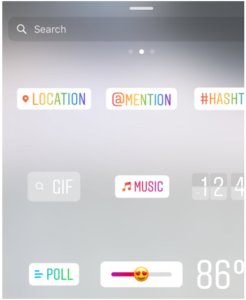
Step 2: Scroll through the various genres and moods, or search for music on your own.
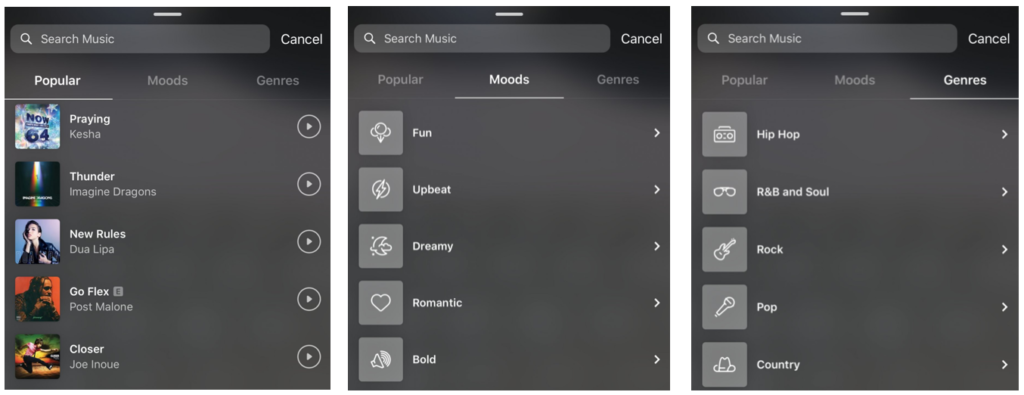
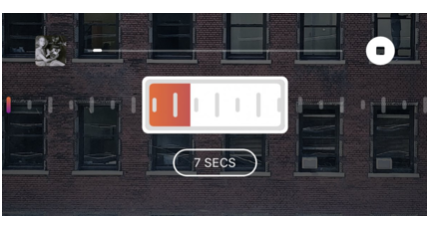
Step 3: Choose the duration of the clip, and which part of the song you want to play in your story. Once the clip is added to the story, you can choose to have the song that’s playing displayed in three different styles, from the album showing to just the title of the artist and the song.
4. New Question Sticker – This new sticker for Instagram Stories allows you to ask a question, and the user can type a response. You will see all the responses privately. This tool will encourage engagement with potential and regular customers.
Uses for the New Instagram Sticker: You can engage more with customers and collect data from the responses and interactions. Ask them what they think about certain products, gain their opinion or start a discussion. Since you can share these responses publicly on your Story feed, this allows you the ability to share consumers ideas or responses too. You could start a competition and the best answer or idea wins a giveaway or even do a quick Q&A if you’re rolling out a new product which people might have questions about.
Here is a guide to add a sticker to your post:
1. Start by tapping the sticker button after uploading a photo or video to Instagram Stories.
2. Select the new question sticker and then type out your prompt. For example, you could write, “Where should we go next?”
3. Once you’ve written your prompt, place it wherever you’d like and share it to your story.
Here are some examples:
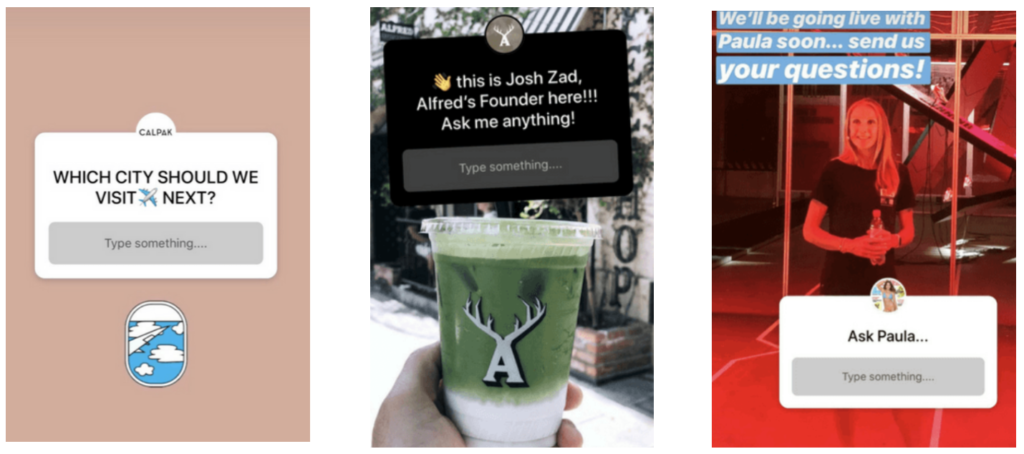
Finally, make sure to thank or respond to your audience as this will hopefully encourage them to engage more in the future.
5. Instagram TV (IGTV) – A new feature that could be seen as the “mini-Youtube” of Instagram. You can upload videos up to one hour. The content is meant to be ‘home-made’ videos, created by influencers and vloggers. The feature also has analytical capabilities so you can see who views, likes and comments on your video, as well as see your audience retention rate and when people swipe away from your video.
How to leverage IGTV? IGTV can be a great way to engage your target audience with interesting content. If you’re already posting videos to your website then this would be another platform to post your videos or vice versa put all of your IGTV videos onto your blogs and website to keep traffic going to your Instagram. Being able to save old IGTV videos and create a collection is a great way to build a social media community, retain followers and customers, and further promote your Brand.
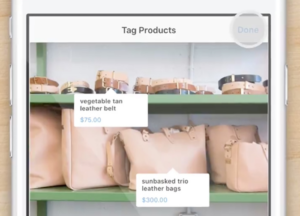
6. Shoppable Tags – a great feature for businesses with e-Commerce websites. In images and videos, businesses can now tag their products. These tags can include the name of the product, its price and provide a link to the product page.
If your products or services are possible to buy online, you should seriously consider this easy-to-use sales channel. The more opportunities your customer have to buy your product the more likely they will spend their money especially if it’s easy to access and obtain information.
1. Receive Notifications from Competitor Content
It’s vital that Brands measure their efforts against the competition to know what’s working and things that could improve. One way you can do this on Instagram is to track what content your competitors publish on a regular basis. This information can be used as inspiration for future posts.
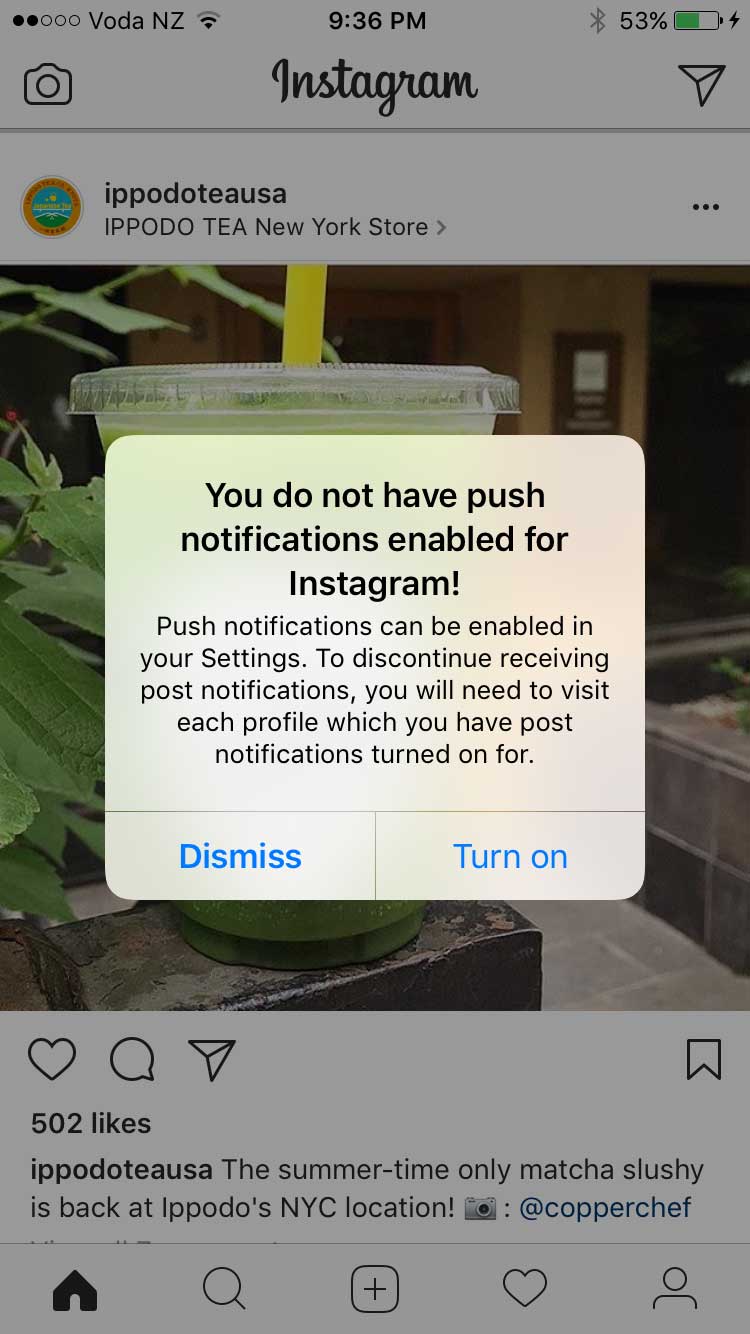
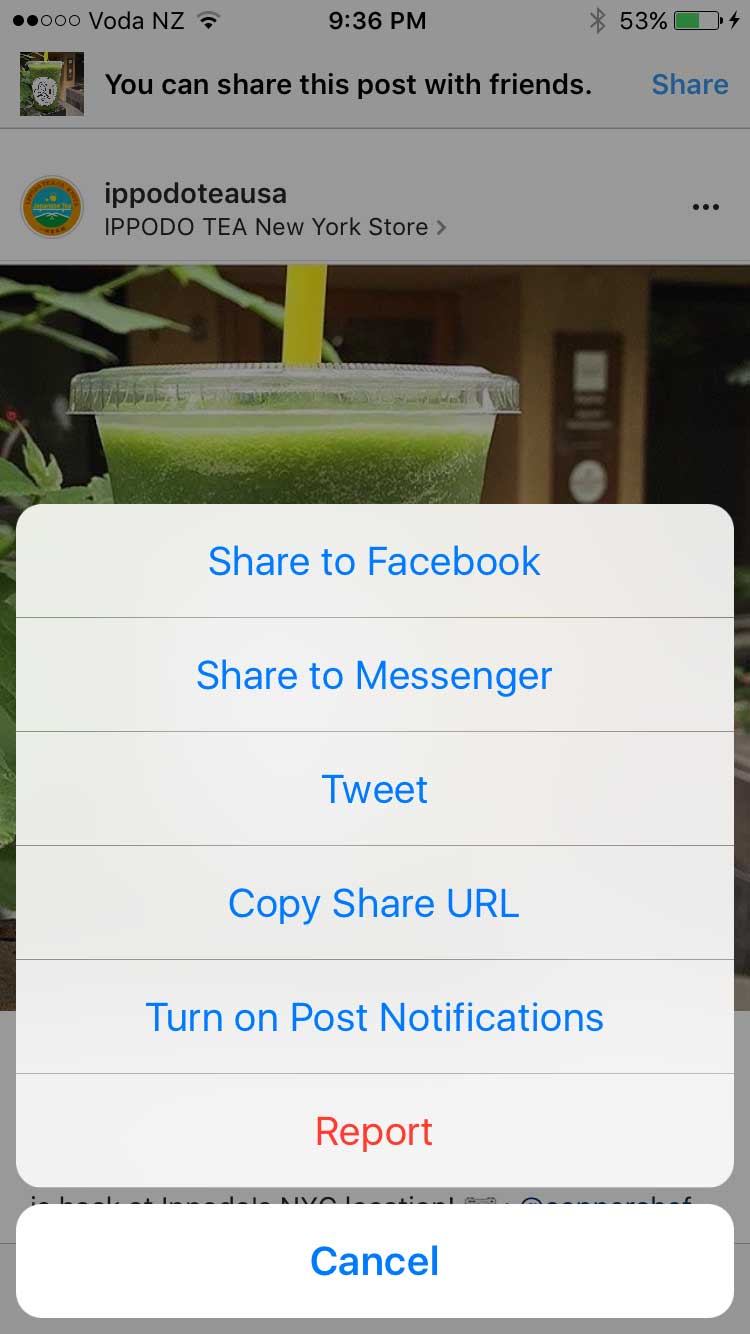
To do this you will first make sure you have Push Notifications enabled for Instagram. Then go to your Instagram and find a post of the Brand you want to track and click on the three dots in the top right hand corner and you will see a list of options – select the last one ‘turn on post notifications’
2. ‘Hide’ Your Hashtags
Every Instagram post you create can be accompanied by a short message or caption and a few hashtags. The hashtags help organise and categorise photos and video content, which aids the process of content discovery and optimisation. It’s better to use the top Instagram hashtags that have an engaging community behind them and are specific to your audience.
Hashtags work well in Instagram – not only do hashtags help spread awareness but they can get your audience engaged. However, some of the general hashtags can be a little boring for users and many brands have simply hidden their unbranded hashtags to avoid taking up too much real estate. Easily hide your additional hashtags by adding a second comment with the tags or by following these steps:
- Click the 123 button on your mobile keyboard (iOS).
- Click return and add either a period, dash or bullet.
- Hit return again and repeat the process a few times to hide your message (Instagram hides after three).
“Posts with at least one Instagram hashtag average 12.6% more engagement than posts without a hashtag”
3. Use Hashtags to Drive Engagement
Instagram hashtags are one of the best ways to grow your Instagram account. Using the right hashtag (or combination of hashtags) can help you expose your brand to large and targeted audiences. In fact, your chances of attracting new followers, getting more likes and increasing engagement are increased by the use of hashtags.
Keep in Mind
· Numbers are allowed in hashtags. However, spaces and special characters, like $ or %, won’t work.
· You can only tag your own posts. You can’t tag other people’s photos/videos.
· You can use up to 30 tags on a post. If you include more than 30 tags on a single photo/video, your comment won’t post.
4. Develop Branded Hashtags
A branded hashtag is a hashtag that’s unique to your business. It can be as simple as your company name, tagline or the name of one of your products or campaigns. Or it can be a hashtag that has nothing to do with your brand name, but has everything to do with your brand identity.
While community hashtags are meant to increase the reach of your message, branded hashtags are designed to connect themes for you and your audience.
A great example is Lululemon’s #thesweatlife
After you tag your post with a hashtag, you’ll be able to tap the hashtag to see a page that shows all photos and videos people have uploaded with that hashtag.
5. Make Your Bio Link Dynamic
You get one clickable link in your Instagram account, but you can change it as many times as you please. Instead of using your home page URL and never touching it again, use the link in your bio to promote your latest content or special promotions.
“Instagram posts with a geotag receive almost 80% more engagement than non-tagged content.”
6. Geotag Content for Higher Engagement
To get your content in front of a larger audience, it’s smart to geotag your images and videos. Users commonly scope tagged locations to follow other people in the same area. By tagging multiple areas with your various content, you spread out your social casting net. But do tag locations where the content belongs.
7. Insert Line Breaks in Your Bio & Captions
Have you ever scrolled through your Instagram feed and noticed a post with an extremely long caption, without any line breaks? Chances are you kept scrolling without giving it a second look.
Hit and then 123 and return button appears!
8. Resize Photos for Instagram
Do you have a photo that you took a while back that would be perfect for Instagram? Don’t just rush to post it. First, make sure that it’s sized and correctly cropped. You can do this manually by cropping your pictures to fit Instagram’s dimensions, but a better solution is to use Landscape.
Landscape is a free tool that resizes your photos to fit perfectly on Instagram and other social networks.
The Facebook-owned photo and video sharing app announced late April 2017 that it reached a huge 700 million users.
It took six months for the app to reach 600 million monthly users in December 2016 and added the last 100 million new monthly active users in the past four months only. To put that in perspective, Instagram took 28 months to reach its first 100 million back in 2013.
Instagram has been aggressively rolling out new features in its battle to compete with rival Snapchat. Back in August 2016, Instagram debuted ‘Stories‘, a near carbon copy of Snapchat’s Stories, which had gained a huge following and threatened Instagram’s grip on users. This move has proved to be a success and has come at Snapchat’s expense. Snapchat saw its growth plummet 82% since Instagram launched Stories.
That feature now has 200 million Instagrammers on board, compared to Snapchat’s 161 million users.
With Instagram Stories, you can bring your story to life in new ways with text and drawing tools that will disappear after 24 hours and won’t appear on your profile grid or in feed.
The Instagram base is now twice the size of Twitter and 200 million ahead of LinkedIn – if your business isn’t represented on Instagram it might be time to get on board.