CATEGORY PAGE (RESOURCES)The Benefits of In-house Social Media Training
Changing algorithms, new ad options, new functionalities – the constant changes in the social media landscape can be hard to stay on top of, and causes headaches for many organisations.
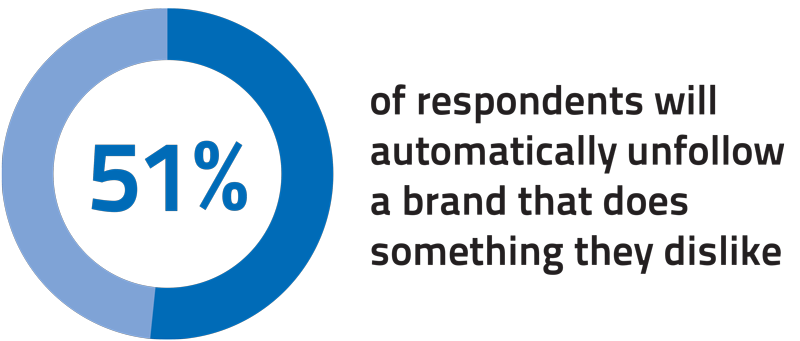
In a survey by Sensai, 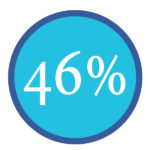
of respondents shared that managing social media channels is harder than filling out income tax paperwork.
The top 6 social media marketing challenges we see for businesses
- Facebook algorithm changes
- Rising ad costs
- Getting noticed in overcrowded feeds
- Too many trends/changes to keep up with
- Not enough people and resources
- Not understanding how to measure results
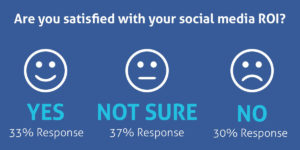
Source: Sensai
Benefits of Social Media Training
- No more ad-hoc social media activity
- Clear, strategic and measurable social media marketing
- Confidence that you are maximising your social media efforts
- Control your share of the conversation without letting your competitors dominate
- Boost staff motivation and morale by developing their skills and knowledge in Social Media
Have you considered Bespoke in-house social media training tailored to meet the requirements of your organisation?
We want to help you become self-sufficient with social media. If you train with us, we’ll give you the confidence, knowledge and practical skills you need to grow. Investing in social media training now will ensure your business does not get left behind.
From building a strategy to what to post and how to analyse results, this training will help you to find new clients, provide support and interact positively with existing and potential customers.
We deliver in-depth courses which give you a blend of best practice, strategy, practical exercises, guides, planning, discussion and Q&A.
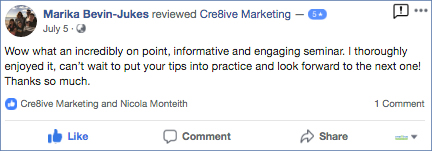
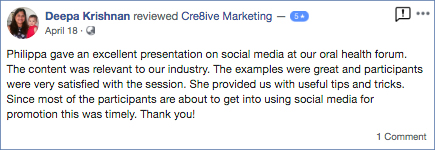
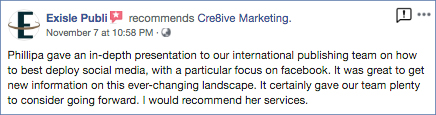
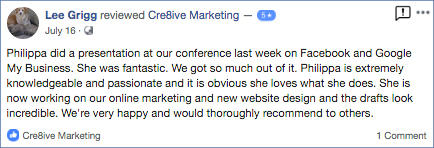
We offer in-house training and workshops and Philippa is often engaged as a keynote speaker. Here is some of our feedback.

Facebook’s Newsfeed has been declining in organic reach for number of years now but in January this year Mark Zuckerberg officially announced that “users will see less public content, including videos and other posts from publishers or businesses.” This is a major update to Facebook’s algorithm and all organisations using Facebook as a marketing tool need to rethink their posting strategy. Here are some tactics to help mitigate this update.
- At the end of a post request an action such as liking, sharing, or commenting below with something.(use this tactic sparingly)
- Respond to every single comment, preferable with ANOTHER question for the commenter to make them comment again.
- When you respond to comment, tag the person in it for extra notification on their homepage.
- Click “like” on every comment, even your own.
- Try to include a catchy image on the post. Simple images work best.
Essentially you want to make it appear there’s a ton of “activity” happening on your post, and Facebook will reward this with preferential placement in people’s Notification Centre and Newsfeed.
Having a Facebook presence isn’t worth much for your brand if you can’t figure out how to cut through the clutter and reach your target market. The best way to do this isn’t what brands like to hear: you need to allocate a budget and spend some money. This is particularly true more than ever since Facebook’s latest algorithm change in January 2018. However, using targeted ads will help you spend wisely.
The more you know about the people you’re advertising to, the better your ads will perform. Facebook offers many options for audience targeting. One of these is Facebook Custom Audiences. With Custom Audiences, you can retarget people who have interacted with your business already. For example, website visitors.
Website Custom Audiences Overview
When you market to a Custom Audience, you know exactly who is seeing your ads. Your messaging can be laser-targeted. This will help you increase your conversion rate and get a better return on your investment.
Most businesses are familiar with the most common types of custom audiences, like custom audiences created from a subscriber email list. There is also the Website Custom Audiences that more businesses should implement for even better results.
Instead of users’ email addresses or phone numbers, you can insert a Facebook Pixel tracking code on your website and target your Facebook Advertising to all users that have visited a specific page on your website during a set time period (up to 180 days).
After you add the Facebook pixel (a snippet of code) to the template of your website, you can create rules based on what page someone visited and how recently. This allows you to target people who know you, and you can craft relevant ads based on specific actions taken on your website.
Here, you’ll be able to create Website Custom Audiences based on the pages your visitor viewed and events they performed – accounting for frequency, values and device used, thereby ensuring you are targeting quality leads from your website and not those who only stay for a matter of seconds and bounce on the first page.
Find out more about the basics of setting up a website Custom Audience.
If you would like help to create a Facebook Marketing Campaign send an email
Running a Facebook Contest or Sweepstakes
Sweepstakes, contests and giveaways are increasingly popular among organisations who are vying for the attention of their social media audiences and for good reason as they can be very successful. When running a promotion make sure you understand what kind you will want to use:
- Sweepstakes are prize giveaways where the winners are randomly chosen.
- Contests choose a winner based on some merit. The winner is chosen based on some criteria such as best photo, most votes on a video, best recipe, etc.
We’ve been keeping an eye on Facebook and have found that many are violating Facebook’s Guidelines when running a sweepstakes or contest. Note, this article is not intended to be legal advice but rather suggestions about how to best comply with Facebook contest rules online.
Here are 3 examples of Timeline contests that violate the new Facebook Promotion Guidelines.
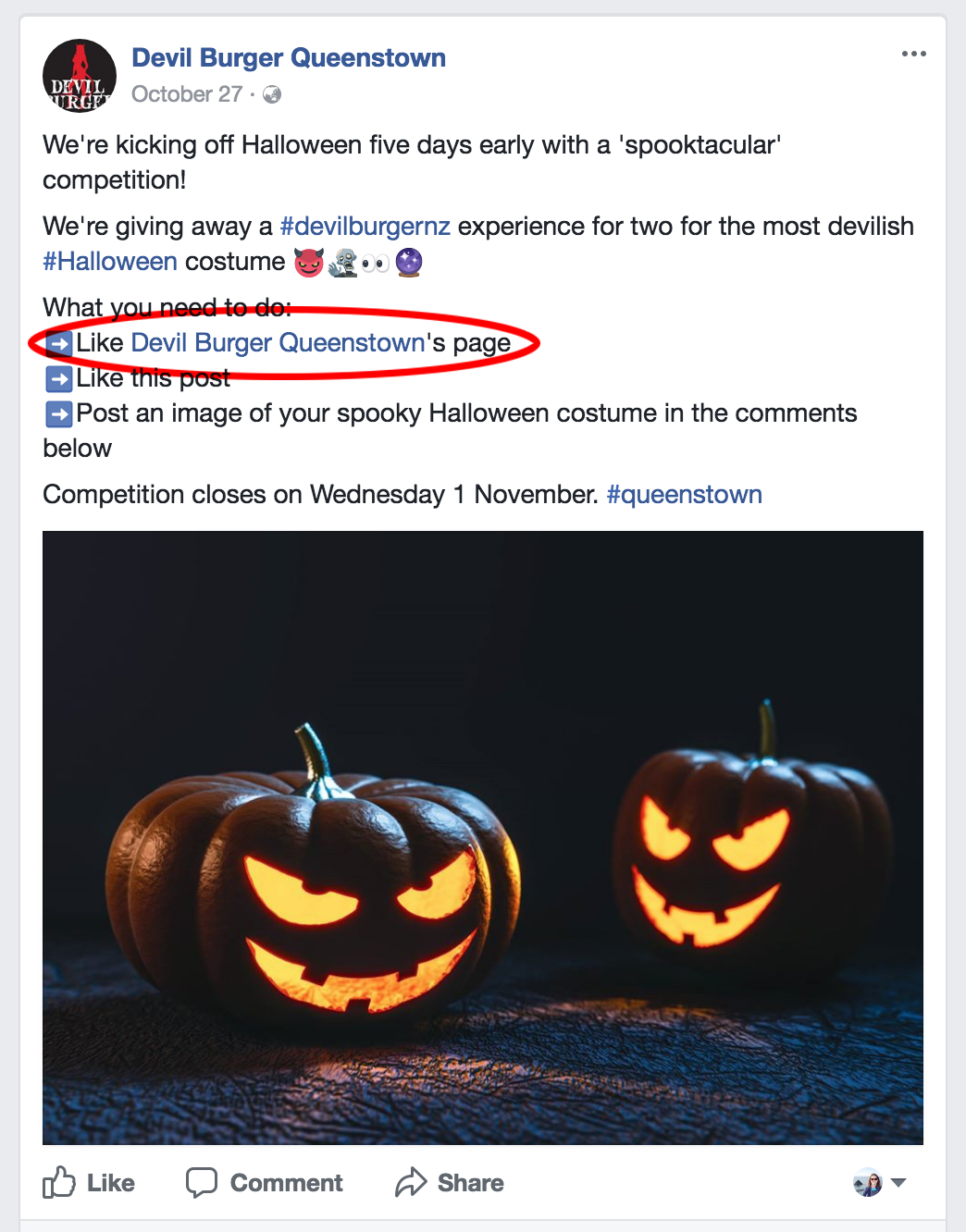
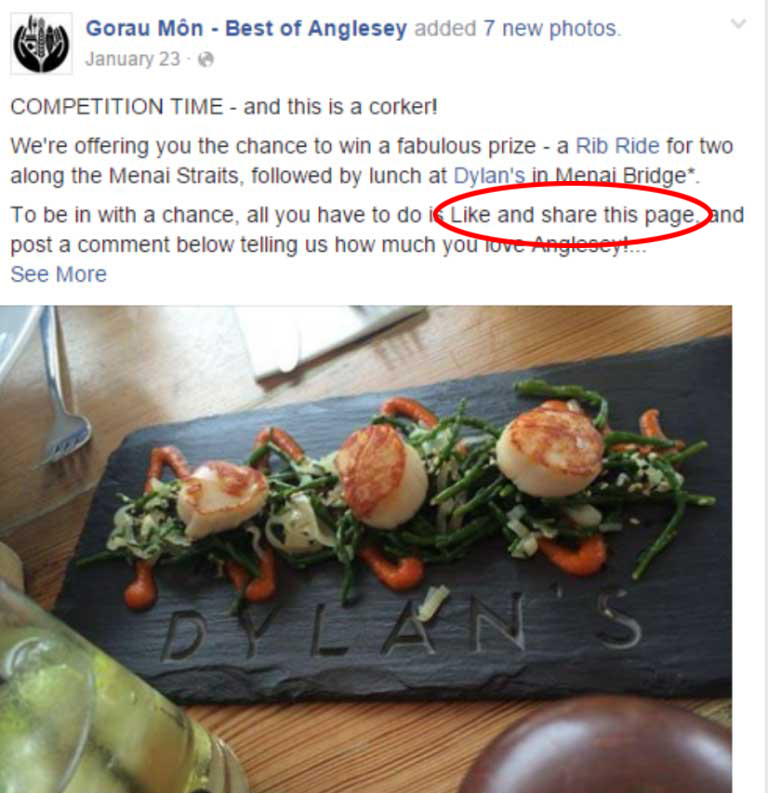
1. Cannot ask People to Like the Page to Enter
You cannot ask people to ‘Like’ your Facebook Page as a condition of entry. Facebook’s reasoning behind this is that it wants users to become a genuine fan that they want to receive news and information from a particular organisation not as a one-off chance of winning of a prize. From an organisation’s point of view it’s actually better to have quality fans not quantity. We have found that when running a contest on Facebook, even though we have not asked our users to like the Page, a number do anyway.
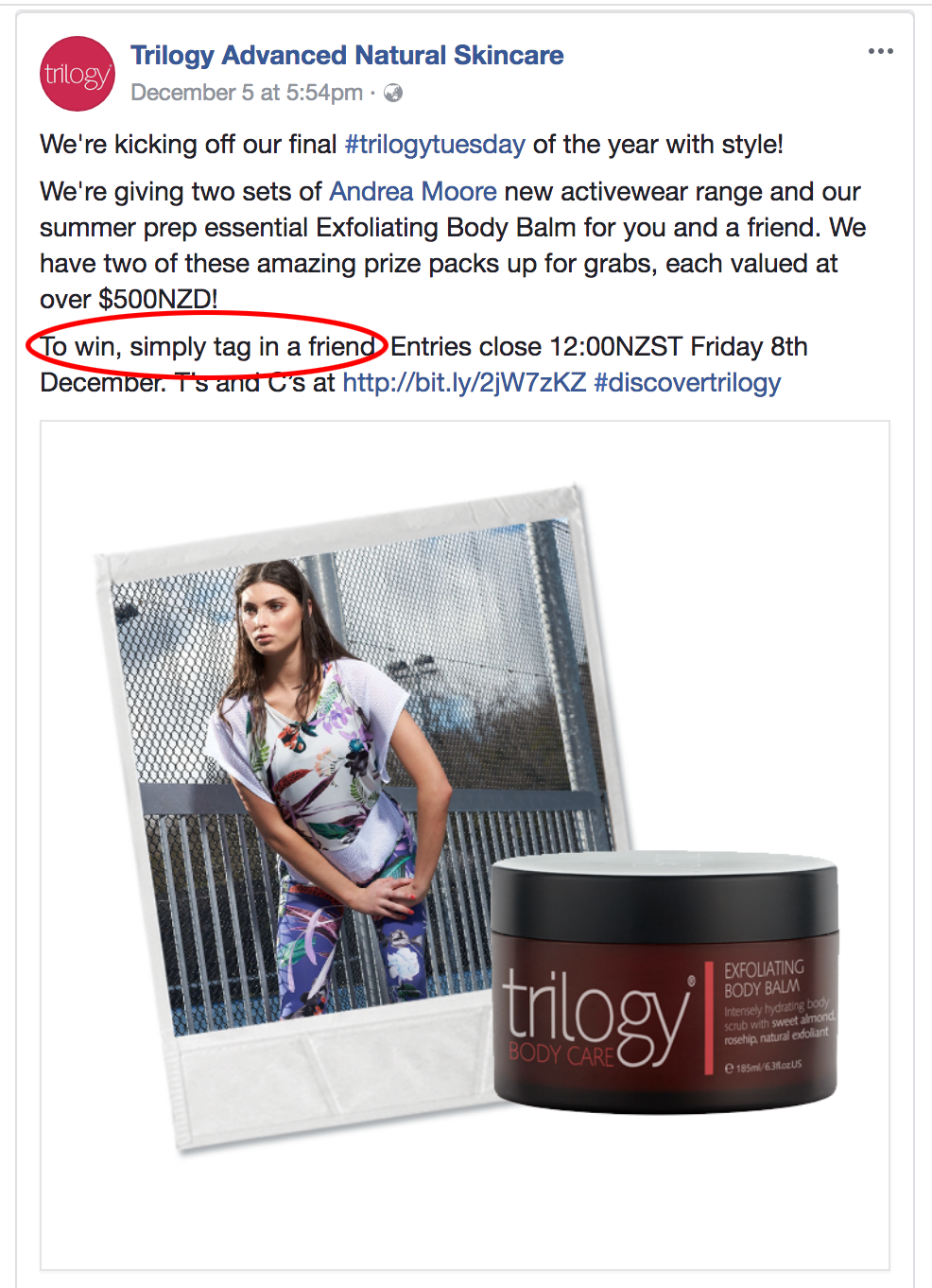
2. Can’t “Tag to Win”
Many businesses do not know that they are not allowed to ask people to ‘Tag’ someone for a chance to win.
Facebook has prohibited businesses from tagging or encouraging people to tag themselves in content that they’re not actually depicted in. For example, it’s alright to ask people to submit names of a new product in exchange for a chance to win a prize as part of a Facebook contest. However, asking fans to tag themselves in pictures of a new product in exchange for a chance to win a prize, is not permitted.
3. Not Permitted to ask Fans to “Share this Post”
Facebook quite clearly states that you are not allowed to ask users to Share your post, however many businesses are unaware about the consequences and do this anyway. If you want to promote your competition wider than your current fans, then ask them to Share the competition post but don’t tell them they have to in order to enter. Or use a third party app which has built-in viral sharing posts for each entry.
4. The Promotion has no terms and eligibility requirements
It is important to include the terms and conditions of your promotion such as any age and residency restrictions. Details of the start and finish, the entry process, who the promoter is, the number of times users can enter etc. You must also comply with applicable rules and regulations governing the promotion and all prizes offered relevant to the country you are operating in. Using the ‘Notes’ tab in your Facebook Page is a great place for the Ts&Cs.
This is What Facebook says About Promotions:
1. If you use Facebook to communicate or administer a promotion (ex: a contest or sweepstakes), you are responsible for the lawful operation of that promotion, including:
- The official rules;
- Offer terms and eligibility requirements (ex: age and residency restrictions); and
- Compliance with applicable rules and regulations governing the promotion and all prizes offered (ex: registration and obtaining necessary regulatory approvals)
2. Promotions on Facebook must include the following:
- A complete release of Facebook by each entrant or participant.
- Acknowledgement that the promotion is in no way sponsored, endorsed or administered by, or associated with, Facebook.
3. Promotions may be administered on Pages or within apps on Facebook. Personal Timelines must not be used to administer promotions (ex: “share on your Timeline to enter” or “share on your friend’s Timeline to get additional entries” is not permitted).
4. We will not assist you in the administration of your promotion, and you agree that if you use our service to administer your promotion, you do so at your own risk.
How You Can Ask Your Fans To Enter Your Facebook Contest
You are allowed to ask users to “like” or “comment” on your post or combine the two together. Quite often businesses will ask users to Like as well as comment to get the maximum effect.
See examples below of what you can ask your fans to do in order to enter your competition.
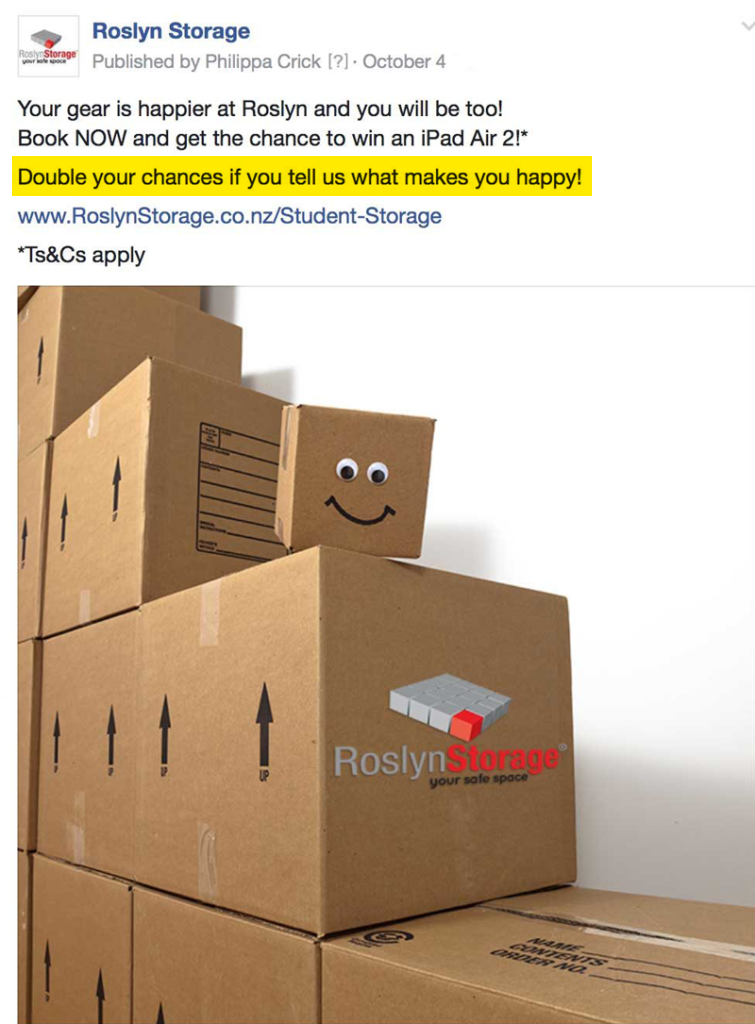
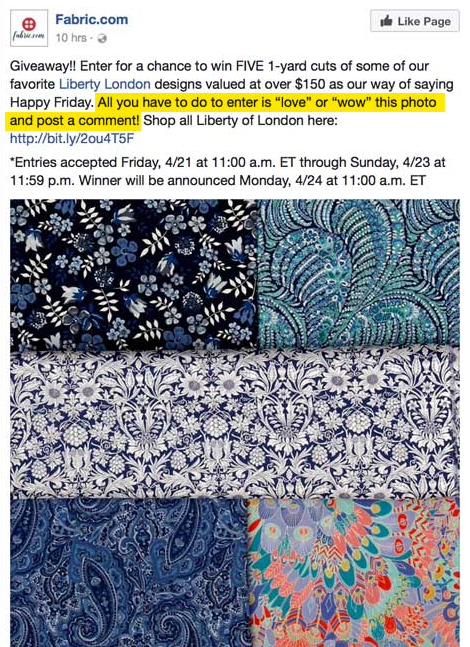
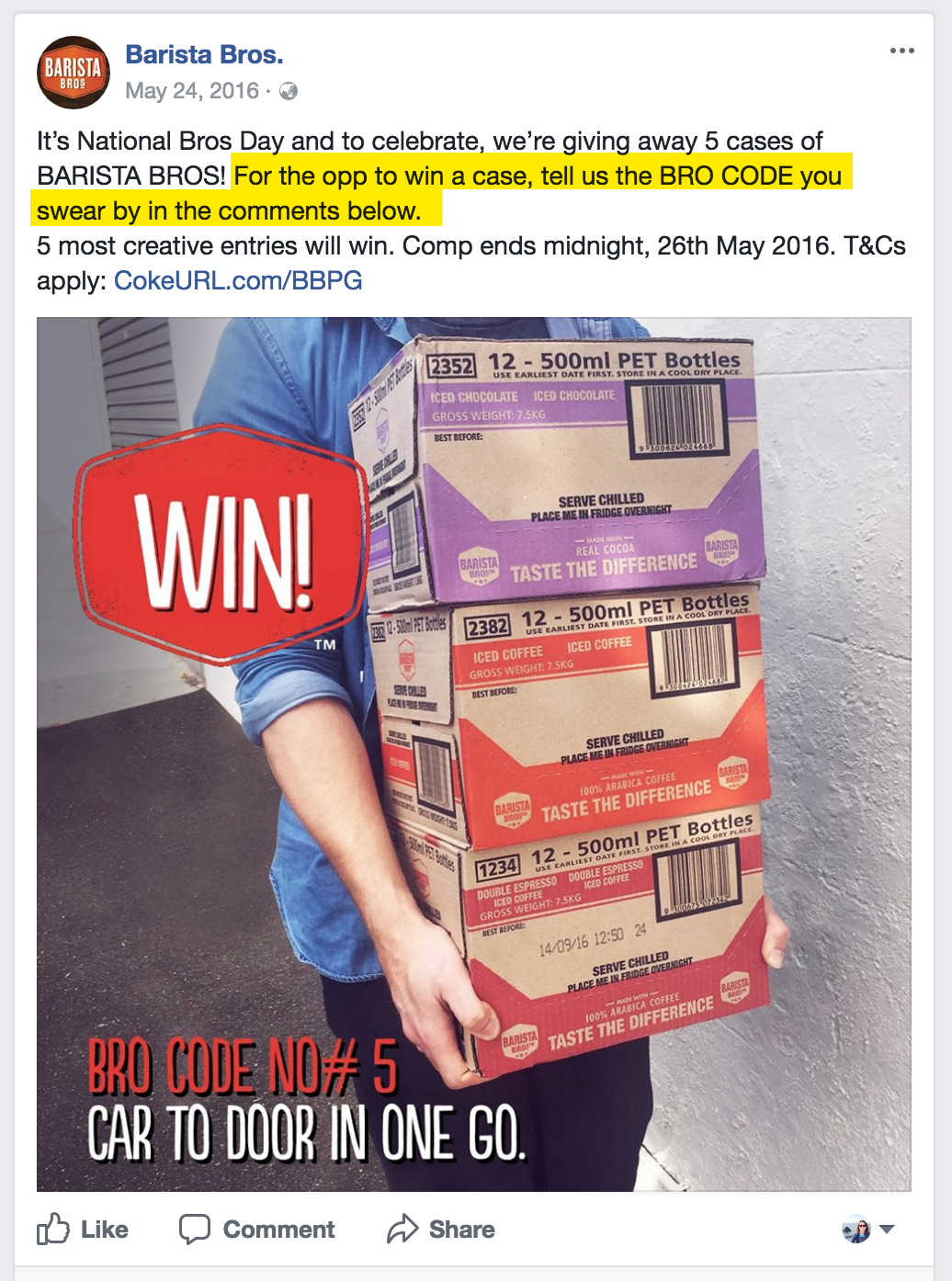
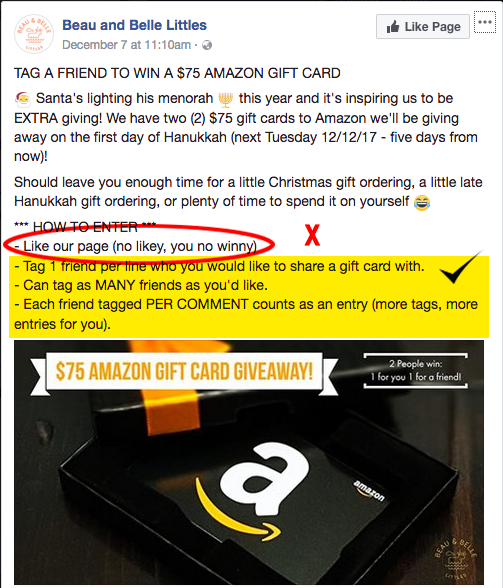
Although you can’t tag a friend as a condition of entry, you could ask your Fans to tag a friend who they would bring if they won a prize that involved someone else, such as a double pass to an event. This example below from Beau and Belle Littles shows how they have violated Facebook guidelines by asking users to like their Page as a condition of entry but also illustrates a clever and approved way to get comments for their giveaway.
After the Contest
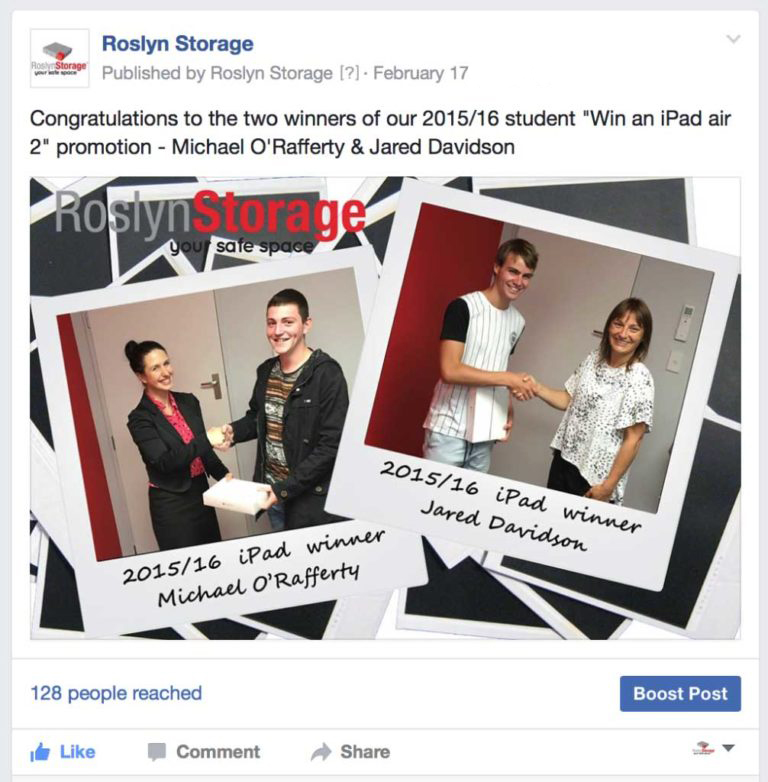
After you have run your contest and the winner has been drawn you may think you are finished but there’s just one thing left to do: Announce (and contact) the winner. To be sure you’ve run your contest within Facebook’s guidelines you must notify your winner before announcing anything on Facebook. The other entrants will be checking your Facebook Page to see if they won or who won. And with Facebook’s update to their promotion guidelines, you can announce contest winners with a Facebook Post. Best practice would be to email the contest winner, then if the winner consents, post a photo of them as a winner on either a blog post or as Facebook post.
Facebook Contest Do’s and Don’ts Summary
YES, you can ask people to do the following as a condition of entry:
- Like a post
- Comment on post
- Answer a question
- Add a photo to a post
- Post on a Page
- Message a Page
- Submit names for a new product
- Tag someone who they would like to bring with them if they won tickets
- Check-in to your business
- Post directly to a Page’s wall
NO, you can’t require people to:
- Share a Page to a user’s personal timeline
- Share a post to a user’s timeline
- Like a Page to enter
- Like a different Page to enter
- Like multiple Pages to enter
- Tag themselves in your post
- Tag other people in your post
What Will Facebook Do?
You may ask “but what will really happen to my Page if I ask users to like my Page to enter?” Maybe not much. However, you might get Facebook’s attention through consistent promotion guideline abuse. If you’re constantly running promotions that ask and incentivise users to tag, like a Page or share a post, you might get in trouble. Plus, if anyone reports your Page then Facebook is immediately alerted to any violations of their guidelines. Anything from a strongly worded message from Facebook itself to punishment of you Page such as:
- suspend fans from liking your page for a certain period of time
- remove the likes that were accumulated over a certain period
- take your page access away
- or completely delete your page
About the Author, Philippa Crick
 Philippa runs Cre8ive Marketing, an advertising, design and digital marketing agency that was originally established in Dunedin in 1978. An experienced Digital Marketing Expert in websites, email marketing, social media and Google Adwords with over 18 years experience across a myriad of sectors. Philippa is also a regular guest speaker at events and marketing trainer for businesses.
When you post updates on your business’s Facebook Page, your followers will potentially see those updates in their News Feeds. Each user’s News Feed is like the front page of a personalised newspaper. It includes recent popular updates both from their personal Facebook friends and from the businesses they follow.
You may think that when you gain a new fan for your business Facebook Page that they will automatically see your posts in their timeline. In fact, they are highly unlikely to see any of your posts. Just because someone has “liked” your page doesn’t mean they’re necessarily going to see your updates when they log onto Facebook. In fact, Facebook says that, on average, only a very small percentage of your fans will see any given update.
Back in 2013 Facebook began this process “Our goal is to show the right content to the right people at the right time so they don’t miss the stories that are important to them. As part of that we want to make sure that the best quality content is being produced, surfaced and shared. Our latest update to the News Feed ranking algorithm helps ensure that the organic content people see from Pages they are connected to is the most interesting to them.”
Facebook has become incredible complex, employing sophisticated algorithms to determine what is quality content. Updates that users have “liked,” shared with their friends, or commented on, will be displayed more often. In other words, the more popular the content is, the more likely your fans will see it.
That’s why your job is not only to post content regularly, but figure out what kinds of updates will get your fans to do something. The more you can inspire your fans to click “Like” on your updates, to leave comments, or to click “Share” to spread your words to their friends, the better your “reach” numbers will be. To show up in as many users’ newsfeeds as possible your content must be fresh, engaging, current and compelling. Then it becomes a cycle; the benefit of having a ‘popular’ post is that your subsequent posts will have an increased likelihood of being shown.
Not all interaction by users is considered equal. Facebook ranks each of the engagement measures with a different weighting.
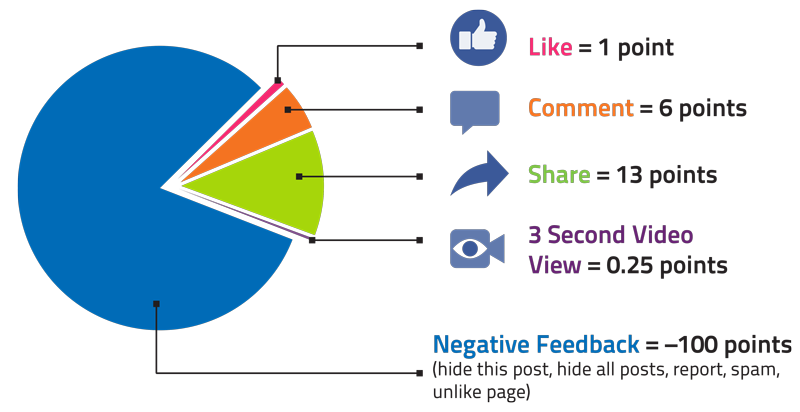
On the other side, if you post low engaging content or worse content that attracts negative feedback such as the user hides the posts, hides all posts or unlikes your Page, this will have a negative impact on your future posts with a lower reach. You need to be regularly checking your engagement in Facebook’s analytics to see what is and what isn’t working.
Detail in Your Facebook Marketing Strategy How to Get Around Declining Organic Reach
Your Page strategy should detail how you are going to produce high quality content and your process for optimising for engagement and reach. Here are some tips to utilise when creating your posts:
- Make your posts timely and relevant (use Facebook Insights to see when your Fans are online)
- Build credibility and trust with your audience
- Ask yourself, “Would people share this with their friends or recommend it to others?”
- Think about, “Would my audience want to see this in their News Feeds?”
- Visual Content is 40 times more likely to be shared on social media channels than non-visual content
- Ask questions with ‘true / false / yes / no’ answers
- Go LIVE – use Facebook’s Live tool as this will have more organic reach than just an image or video linked from Youtube
- Other ideas about how to generate Facebook engagement
Of course, for any important messages – you need to pay.
If you need more assistance with your Facebook strategy and understanding how to get the most out of it, you can join a group training session or have a private training scheduled with an expert in Facebook.
As from 19 July 2017, Facebook removed the ability to edit previews on LINK posts which is when you link to other websites in your post. When you do this type of update, Facebook will fetch this page’s information to display a title, description and image. Previously you could change the image and copy that appeared however now Facebook has stopped this to help limit the spread of false news.
If you want a specific image to appear you will now have to create a photo carousel, see example. The size is now 1080×1080 pixels.
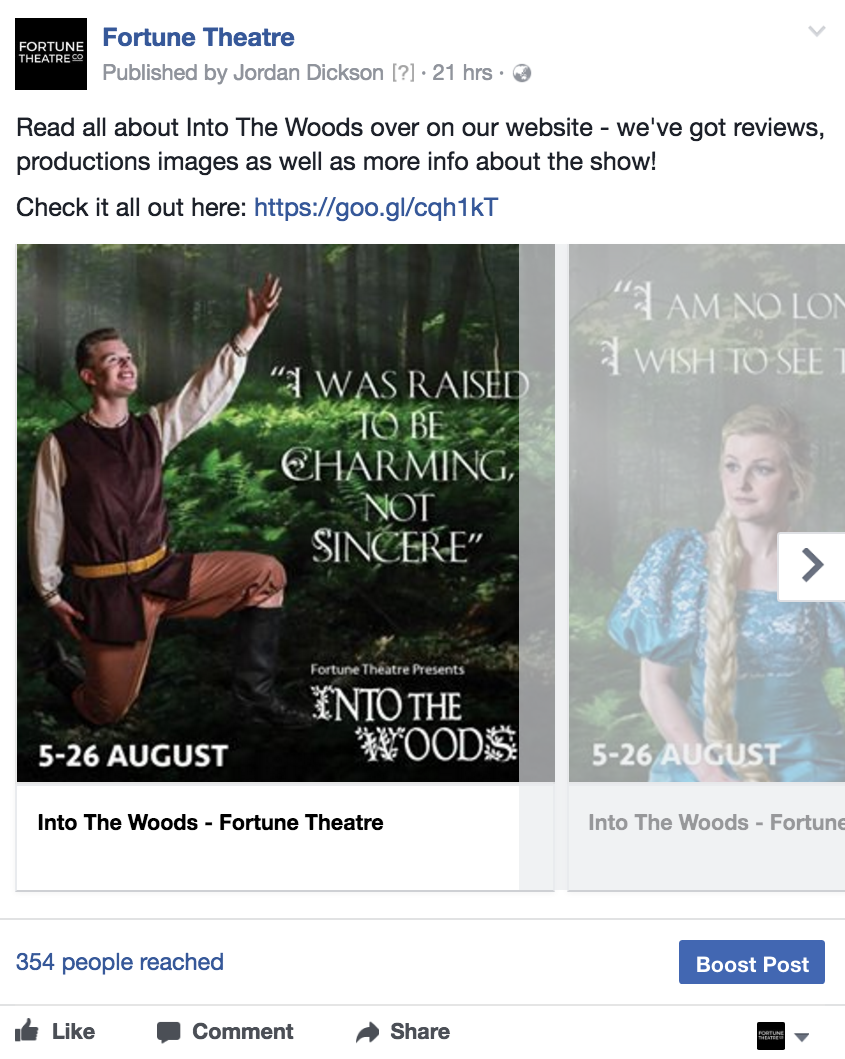
If you want to link a Facebook post to your website, try to keep your web images as close to 1.91:1 aspect ratio as possible to display the full image in News Feed without any cropping. Use images that are at least 1200 x 630 pixels for the best display on high resolution devices.
However, if you are a publisher, Facebook is rolling out a new feature, called “Link Ownership.” It’s a new tab under Publishing Tools and is mostly only available for media pages. If you have access to this feature you will need to act fast as you only have until 12 September to active this feature.
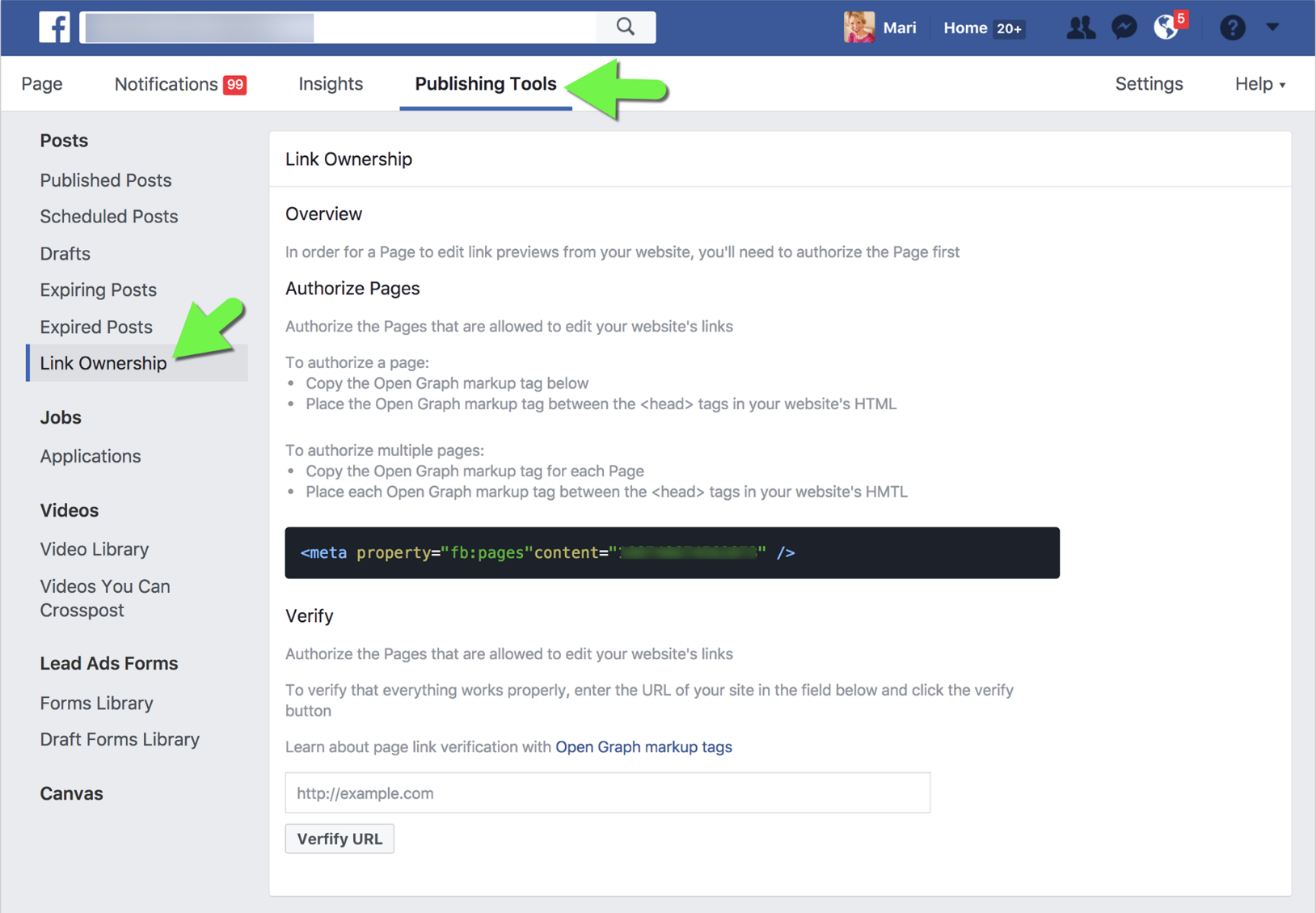
Facebook’s official announcement states:
“On September 12, 2017 we will complete the feature removal such that publishers’ Page(s) will only be allowed to edit links from website domains they have authorised with the link ownership tool.”
The ability to ‘claim’ Link Ownership requires placing a piece of code on your website and then they are able to edit their OWN links – not other’s.
On the 22 March 2017 Facebook announced that users can now broadcast live video from their desktop or laptop computers. Previously the Facebook Live tool was only available on your smart phone or through third party tools.
How to Broadcast on Facebook Live from your desktop without using Third Party Tools
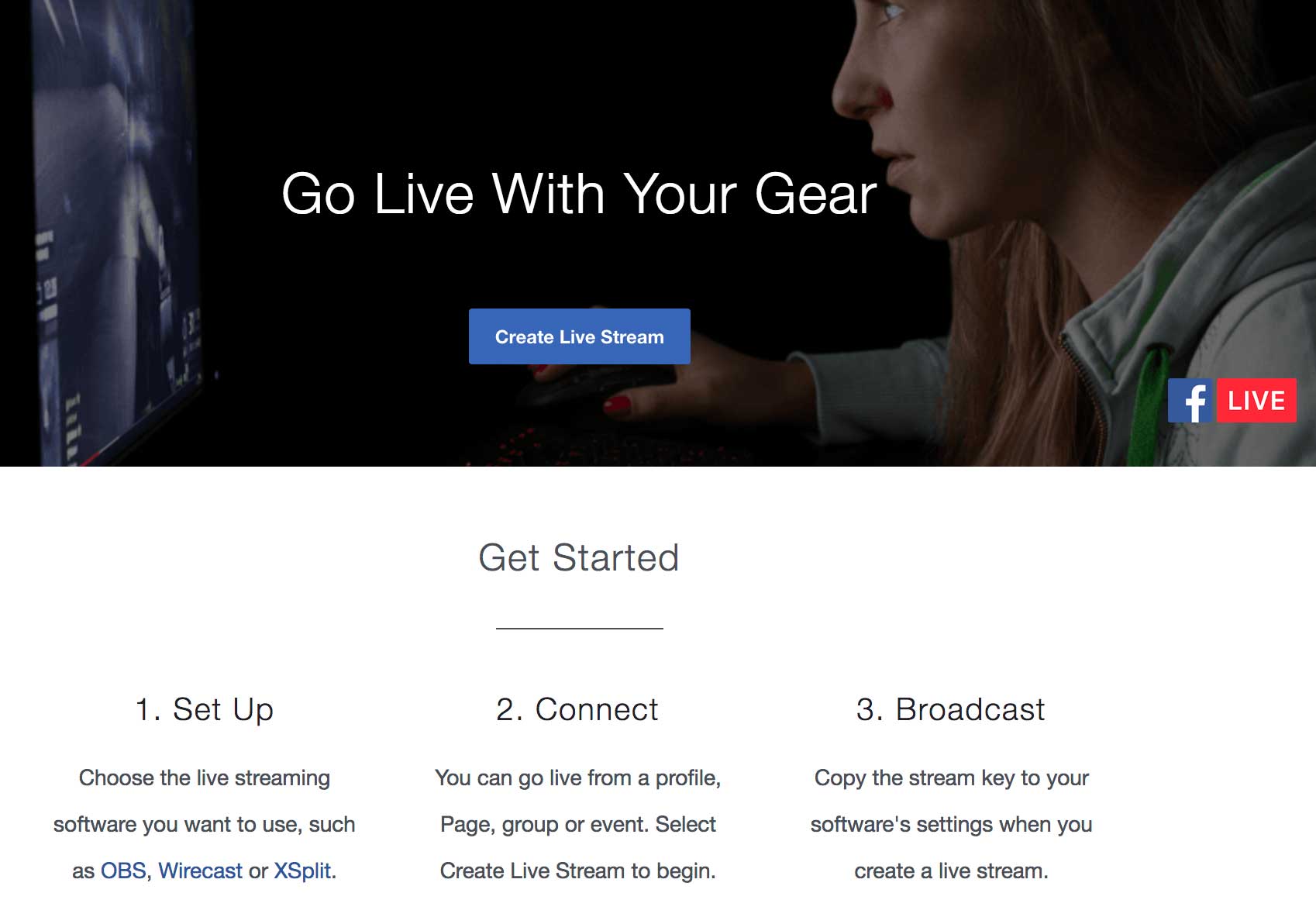
To get started on your live broadcast from a computer, click “Live Video” from the top of your News Feed or Timeline, then follow the prompts to add a description and choose your audience. You will need to download streaming software in order for this to work.
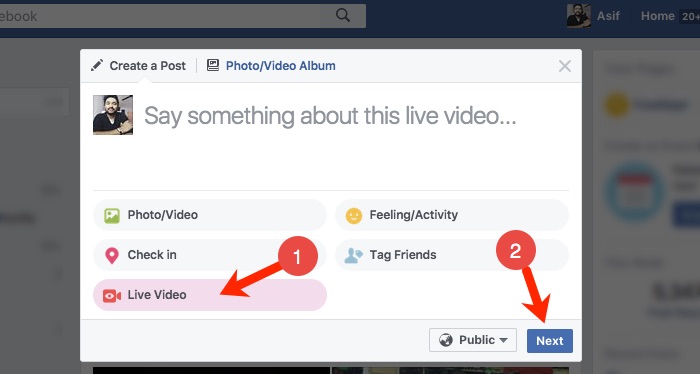
New Streaming Software
Facebook has stated with this new Facebook feature “People can seamlessly share their screens, insert graphics, switch cameras, or use professional equipment in Facebook Live videos. They also have the option to broadcast to Facebook Groups they belong to, Facebook Events they’re part of, or Facebook Pages they manage.”
Before you can live stream to Facebook, you’ll need to download streaming software.
Other Facebook Live Tools
There are various other new Facebook Live tools that you can use:
NEW eCamm Live. Only $29.95 one-time fee! Only for Macs, a desktop app that is easy to use, you can screen share, add media, add text, image overlays and can broadcast to your profile or your pages or groups. However, it doesn’t allow you to set up scenes in advance, can’t bring in guests, doesn’t allow you to stream to multiple platforms, no integration with Facebook Events pages, and you can’t schedule live broadcasts.
Third party apps:
BeLive.tv = currently in FREE public beta! Contains Q&A mode where you can display viewer questions and 2-person interview mode; talk-show mode coming.
BlueJeans Network = multi-person video conferencing (up to 100, unlimited on Facebook Live) with desktop and media sharing. $39.95/mo
Zoom Video Communications = multi-person video conferencing (up to 50, unlimited on Facebook Live) with desktop and media sharing. Starting at $54.99/mo
Open Broadcaster Software = Free and open source software for video recording and live streaming. Download and start streaming quickly and easily on Windows, Mac or Linux.
There was an important change to Facebook late in 2016 that you may have missed – Facebook wants to clear users’ feeds of click bait and unscrupulous headlines.
Click bait headlines intentionally omit crucial information. This forces people to click through to find out the answer, but they then quickly return to the News Feed.
By analysing tens of thousands of posts, Facebook confirmed that the two most common click bait styles involve withholding information, examples such as “You’ll Never Believe What Happened Next!” and “You’ll never look at a Barbie doll the same after seeing these paintings.” and misleading or manipulating users into clicking.
With that in mind, Facebook’s algorithm can identify pages and websites posting too much click bait and lower the reach. Their goal is not only to make the News Feed more trustworthy for users, Facebook wants these changes to have an impact on the content managers pushing out information.
Pages aren’t blacklisted forever, so posts can regain a larger audience if they stop publishing click bait headlines.
Facebook has created an article to help businesses with suggestions about what else they can use to avoid click-baiting techniques.
New features to Facebook Live
Facebook released some important updates earlier this year for Facebook Live to give more customisation options and tools for publishers.
- Going Live from Web
People can now go Live on Facebook through a web browser. Previously the Live videos were only recorded on mobile but now you can create content on laptops and desktops. - Live Contributor for Pages
Admins can now assign ‘Live Contributor’ to use Live feature from a Page. Previously, only admins could go Live but with this update, other people can now go Live. For example, an admin can assign a fan of their page to be a ‘Live Contributor’ who can then shoot Live video for this Page. - Insights Updated for Video
Profiles with over 5,000 followers will soon have the video metrics to give improved insight on their video performance. The metrics include total minutes viewed and total engagement. - Live Comment Pinning
Broadcasters can now pin comments to the bottom of a live broadcast. This update encourages publishers to highlight specific comments for their viewers to see. - Video Permalink for Pages
Facebook is rolling out a permalink which directs people to the Page’s video content. It will be accessible via facebook.com/pagename/videos. People who visit the link will be shown a live video if there is a Facebook Live video underway, as well as a library of the Page’s previous live and non-live videos. - Cross-posting of Previously Live Videos
After a publisher has finished recording a Facebook Live video, they can post the video to multiple Pages at the same time.
New Ways to Watch Facebook Video
Facebook announced in February 2017 that they are focused on continuously improving the video experience. Here are some of their latest they hope will make watching video on Facebook richer, more engaging and more flexible.
- Sound to videos in News Feed
Facebook is rolling out automatic sound to play videos in the News Feed. If the phone is on sound, the videos will play with sound. Sound fades in and out as you scroll through videos in News Feed. - Vertical Video
Larger preview of vertical videos in News Feed is now available to everyone watching videos on iOS and Android. You’ll start seeing vertical videos with a 2:3 aspect ratio (as opposed to 1:1) on your News Feed without having to expand them. - Watch and Scroll
It’s now possible to minimise the video you’re watching in News Feed to a picture-in-picture view in the corner of your mobile screen while you scroll down the News Feed to check other stories. - Facebook Video App for TV
New Facebook video app has been announced for TV. The video app for TV helps you to enjoy Facebook videos on a bigger screen. The app will roll out to app stores for Apple TV, Amazon Fire TV and Samsung Smart TV, with more platforms to come.
Want to get traction with your social media posts, email marketing and more? We have created this optimal character length guide for Facebook, Twitter, Hashtags, Domains and subject lines to help you get more engagement.
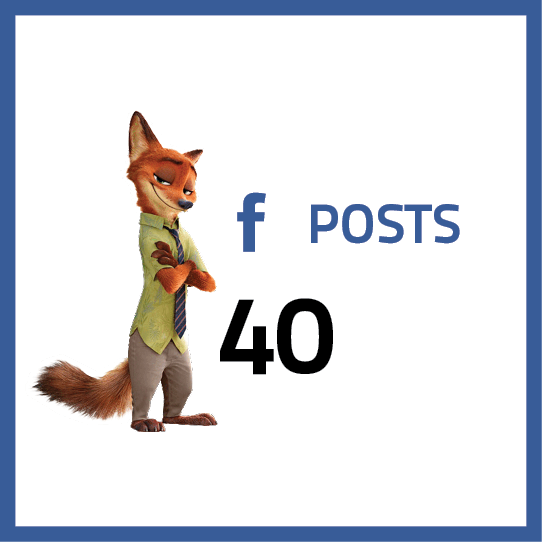
Posts with 40 characters receive 86% more engagement than posts with a higher character count
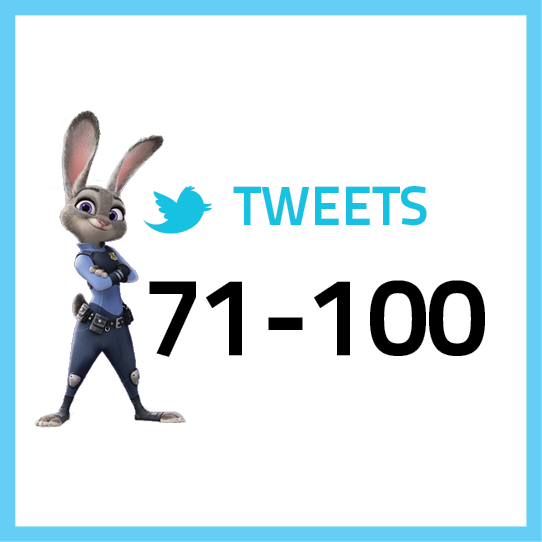
Tweets shorter than 100 characters have a 17% higher engagement rate
HASHTAGS
Don’t use spaces or special characters, don’t start with or only use numbers, and be careful with using slang

EMAIL SUBJECTS
Subject lines containing
28-39 characters get an open rate of 12.2% and click rate of 4% on average
DOMAIN NAMES
The best domain names are short, easy to remember and spell, don’t contain hyphens or numbers, and have a top level extension

PARAGRAPHS
Opening paragraphs with larger fonts and fewer characters per line make it easier for the reader to focus and jump quickly from one line to the next