CATEGORY PAGE (RESOURCES)9 Tips to Increase Instagram Engagement
Tips to Increase Instagram Engagement
The Instagram platform makes use of a constantly evolving algorithm to dictate the order of posts that users see in their feeds. Instagram’s algorithm aims to predict what posts you want to see and the content you care about. The algorithm takes into account several key factors when prioritising content in user feeds; engagement is perhaps the most important part of the algorithm. But what characterises engagement and how is it measured? An even better question is how do you increase engagement on your Instagram?
For engagement purposes, you should focus on several defining metrics:
Views and impressions
Views and impressions are the total number of times your post (whether photo or video) has been seen. They can come from a user seeing your post on their feed, directly on your profile, or the Explore page.
- Likes
Likes are Instagram’s simplest form of measuring engagement. They serve as a good quantitative measure of how ‘likeable’ your content is. Though likes are not the deepest form of engagement, they still represent the baseline popularity of your post.
- Comments
Similar to likes, comments are a quantitative measure of engagement but are a much more valuable form because they are much deeper than a simple double-tap. To comment on a post means users are highly engaged with your content because they took to respond or say something about it.
- Shares and reposts
Shares and reposts essentially act as organic advertisements of your brand or content. This form of engagement goes even deeper than a comment. A share or repost indicates that users are willing to be associated with you and your brand.
While these are the primary measure of engagement, it is also important to keep tabs on interactions, which are the total number of actions taken on your profile such as visits, clicks, and contact.
Now that you know the metrics that measure engagement, here are some tips to improve your profile’s engagement:
9 Powerful Tips to Boost Your Instagram Engagement
- Create quality content. It is no secret that Instagram is a visual sharing social media platform. Creating visually appealing posts is essential to getting users to stop scrolling through their feed long enough to really engage with your post. Take the time to create visuals that stand out. Rather than focusing on posting products, try sharing experiences or telling stories that draw people in and gives them a reason to double-tap.
- Be consistent. Now that you are creating quality content, it is important to establish and maintain a consistent posting schedule. Posting regularly is a good way to build a loyal following on Instagram allowing followers to build a relationship with your brand and get into a habit of engaging with your content.
- Know the best times to post. Knowing when to post ensures your audience is actually seeing your content, which is key to getting high engagement on your posts. You can track previous post engagement and manually using a combination of Instagram Insights, data monitoring, and testing different posting times or there are a variety of different apps and tools available that do all the calculations for you. Either way you do it, it is important to know when your target audience is online so your posts are fresh in their feeds.
- Establish a ‘look’ to your posts and overall profile. Give your posts a distinct filter and establish a colour scheme. Establishing a defining look and sticking to it gives followers the opportunity to recognise your posts on their feed and gives your profile an identity.
- Regularly post stories and make use of sticker features. Stories may only last for 24 hours, but they are a great way of increasing engagement. Stories can be used to draw attention to new posts and encouraging viewers to check out your profile. Using Story stickers is also a great way to start conversations about your brand. Use the question sticker to let your followers get to you or get more information about your brand. Poll and vote stickers can be used to understand and gauge followers’ opinions regarding your products or services.
- Use hashtags. Instagram allows you to use up to 30 hashtags per post and you should make use of this feature; 30 hashtags might be excessive but using a good number of hashtags can increase the reach of your post. Create a basic branded hashtag that should be applied to any post and can be used by followers to share user-generated content associated with your brand. Branded hashtags can also be used for product launches, promotions, and special events. Long-tail hashtags are detailed hashtags that can also be used to reflect the content of your post. Long-tailed hashtags are better to use than simple hashtags because there are fewer associated posts to compete with and you are more likely to be discovered.
- Include locations. Adding a location to every post boosts exposure, which in turn leads to higher engagement. By using a location tag, your post appears in that locations’ recent associated posts. Users that search for posts in your area will likely come across your post.
- Mention and tag other accounts . If your post features a person or another brand, tag them! Not only will they be notified of the post which will drive them to your page, but it also gives them the ability to repost or share your content. Mentioning other accounts increases exposure and builds relationships with other accounts and users.
- Reply to direct messages (DMs) and comments. Remember that building a relationship and brand loyalty are important when it comes to engagement. Instagram is all about community so encourage conversation and then make sure you reply to it. Make sure you take the time to listen and respond to other accounts reaching out to you.
Creating consistent and quality content, analysing your insights and engaging with other social media accounts are some of the most important steps to increasing your Instagram engagement. Follow these steps to work in harmony with Instagram’s algorithm and watch your likes, followers, shares and engagement increase!
Changing algorithms, new ad options, new functionalities – the constant changes in the social media landscape can be hard to stay on top of, and causes headaches for many organisations.
In a survey by Sensai, 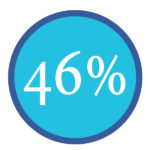
of respondents shared that managing social media channels is harder than filling out income tax paperwork.
The top 6 social media marketing challenges we see for businesses
- Facebook algorithm changes
- Rising ad costs
- Getting noticed in overcrowded feeds
- Too many trends/changes to keep up with
- Not enough people and resources
- Not understanding how to measure results
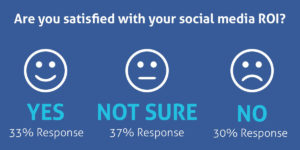
Source: Sensai
Benefits of Social Media Training
- No more ad-hoc social media activity
- Clear, strategic and measurable social media marketing
- Confidence that you are maximising your social media efforts
- Control your share of the conversation without letting your competitors dominate
- Boost staff motivation and morale by developing their skills and knowledge in Social Media
Have you considered Bespoke in-house social media training tailored to meet the requirements of your organisation?
We want to help you become self-sufficient with social media. If you train with us, we’ll give you the confidence, knowledge and practical skills you need to grow. Investing in social media training now will ensure your business does not get left behind.
From building a strategy to what to post and how to analyse results, this training will help you to find new clients, provide support and interact positively with existing and potential customers.
We deliver in-depth courses which give you a blend of best practice, strategy, practical exercises, guides, planning, discussion and Q&A.
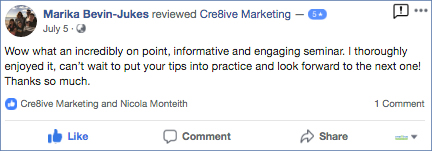
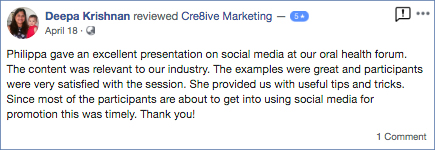
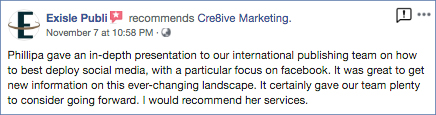
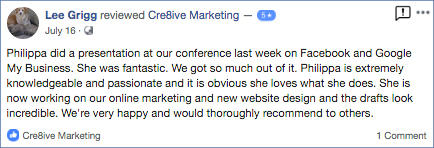
We offer in-house training and workshops and Philippa is often engaged as a keynote speaker. Here is some of our feedback.

Running a Facebook Contest or Sweepstakes
Sweepstakes, contests and giveaways are increasingly popular among organisations who are vying for the attention of their social media audiences and for good reason as they can be very successful. When running a promotion make sure you understand what kind you will want to use:
- Sweepstakes are prize giveaways where the winners are randomly chosen.
- Contests choose a winner based on some merit. The winner is chosen based on some criteria such as best photo, most votes on a video, best recipe, etc.
We’ve been keeping an eye on Facebook and have found that many are violating Facebook’s Guidelines when running a sweepstakes or contest. Note, this article is not intended to be legal advice but rather suggestions about how to best comply with Facebook contest rules online.
Here are 3 examples of Timeline contests that violate the new Facebook Promotion Guidelines.
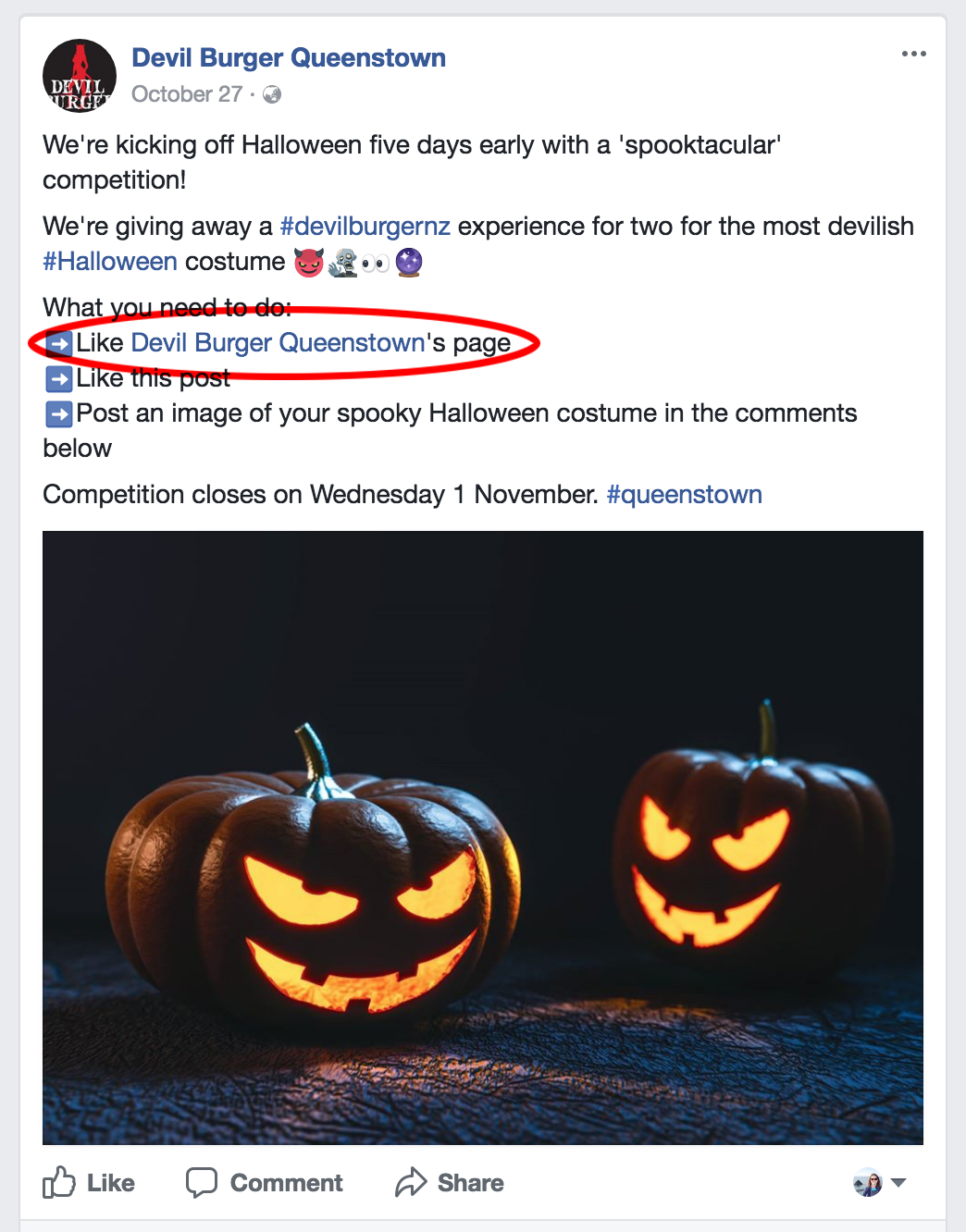
1. Cannot ask People to Like the Page to Enter
You cannot ask people to ‘Like’ your Facebook Page as a condition of entry. Facebook’s reasoning behind this is that it wants users to become a genuine fan that they want to receive news and information from a particular organisation not as a one-off chance of winning of a prize. From an organisation’s point of view it’s actually better to have quality fans not quantity. We have found that when running a contest on Facebook, even though we have not asked our users to like the Page, a number do anyway.
2. Can’t “Tag to Win”
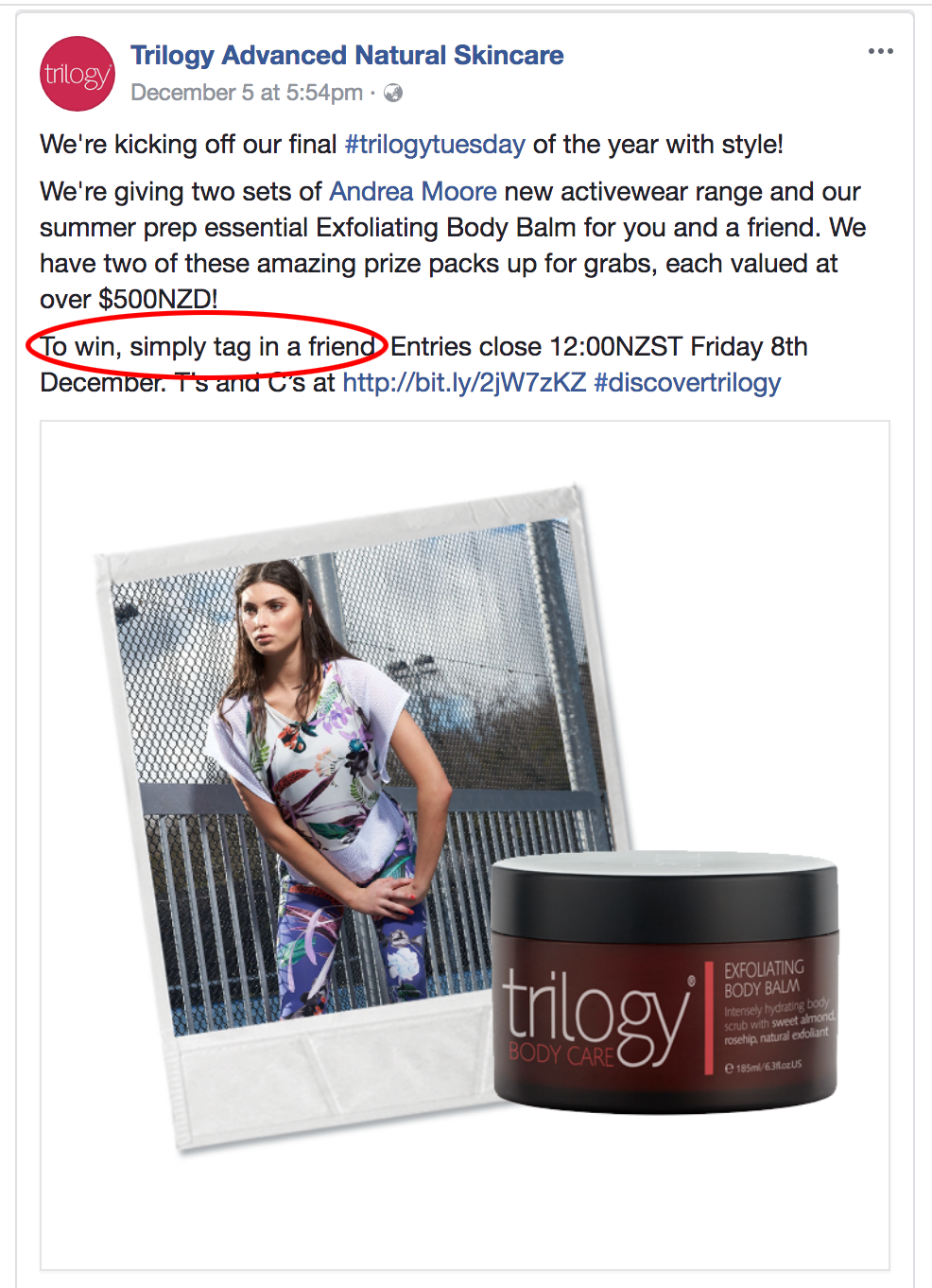
Many businesses do not know that they are not allowed to ask people to ‘Tag’ someone for a chance to win.
Facebook has prohibited businesses from tagging or encouraging people to tag themselves in content that they’re not actually depicted in. For example, it’s alright to ask people to submit names of a new product in exchange for a chance to win a prize as part of a Facebook contest. However, asking fans to tag themselves in pictures of a new product in exchange for a chance to win a prize, is not permitted.
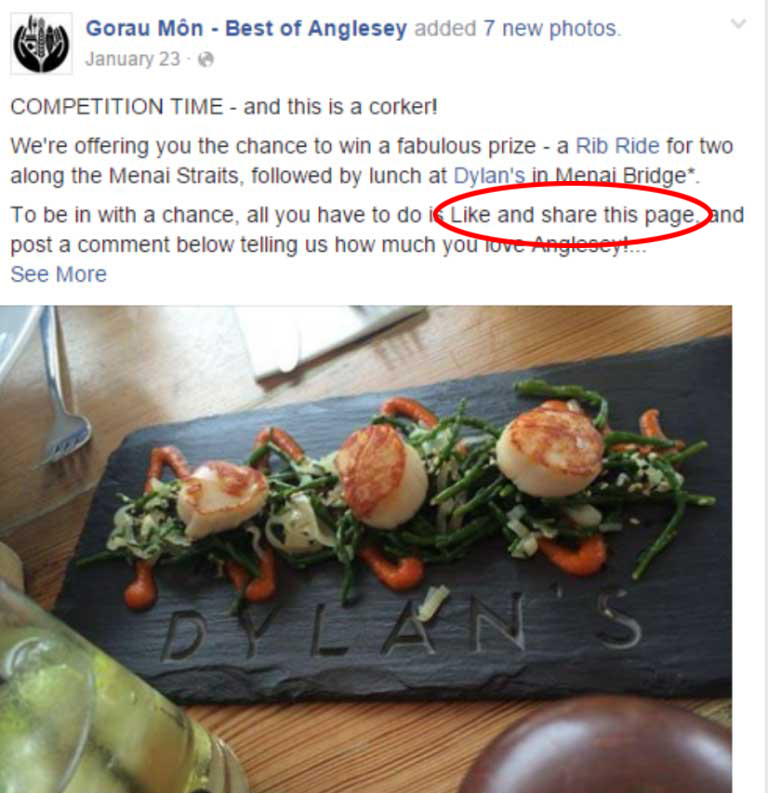
3. Not Permitted to ask Fans to “Share this Post”
Facebook quite clearly states that you are not allowed to ask users to Share your post, however many businesses are unaware about the consequences and do this anyway. If you want to promote your competition wider than your current fans, then ask them to Share the competition post but don’t tell them they have to in order to enter. Or use a third party app which has built-in viral sharing posts for each entry.
4. The Promotion has no terms and eligibility requirements
It is important to include the terms and conditions of your promotion such as any age and residency restrictions. Details of the start and finish, the entry process, who the promoter is, the number of times users can enter etc. You must also comply with applicable rules and regulations governing the promotion and all prizes offered relevant to the country you are operating in. Using the ‘Notes’ tab in your Facebook Page is a great place for the Ts&Cs.
This is What Facebook says About Promotions:
1. If you use Facebook to communicate or administer a promotion (ex: a contest or sweepstakes), you are responsible for the lawful operation of that promotion, including:
- The official rules;
- Offer terms and eligibility requirements (ex: age and residency restrictions); and
- Compliance with applicable rules and regulations governing the promotion and all prizes offered (ex: registration and obtaining necessary regulatory approvals)
2. Promotions on Facebook must include the following:
- A complete release of Facebook by each entrant or participant.
- Acknowledgement that the promotion is in no way sponsored, endorsed or administered by, or associated with, Facebook.
3. Promotions may be administered on Pages or within apps on Facebook. Personal Timelines must not be used to administer promotions (ex: “share on your Timeline to enter” or “share on your friend’s Timeline to get additional entries” is not permitted).
4. We will not assist you in the administration of your promotion, and you agree that if you use our service to administer your promotion, you do so at your own risk.
How You Can Ask Your Fans To Enter Your Facebook Contest
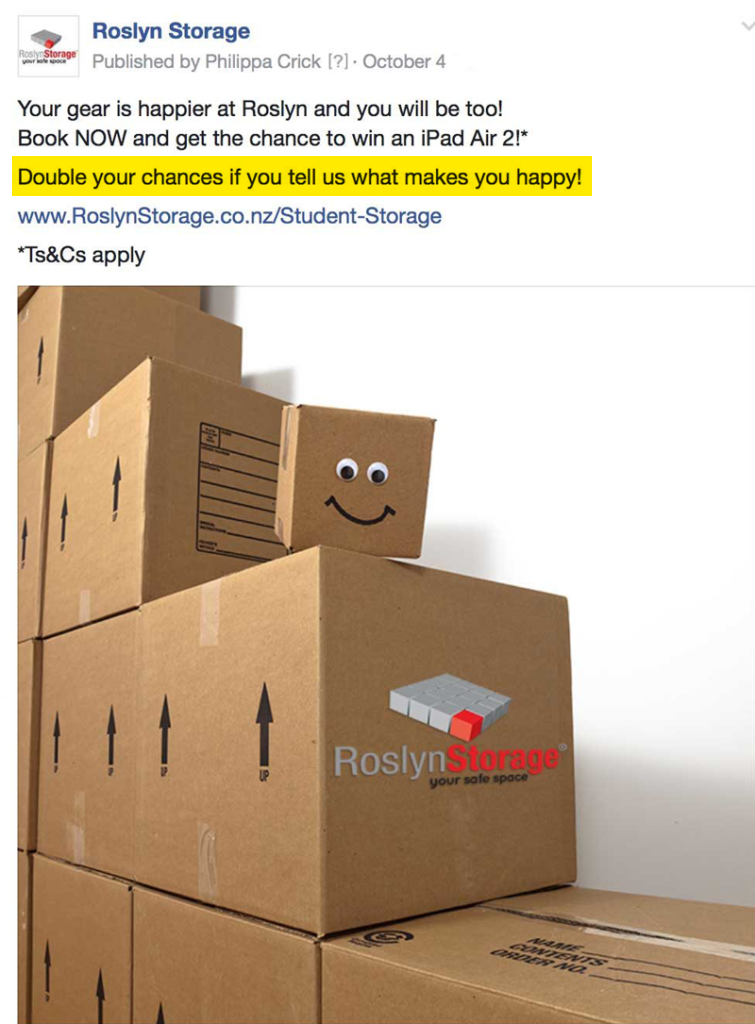
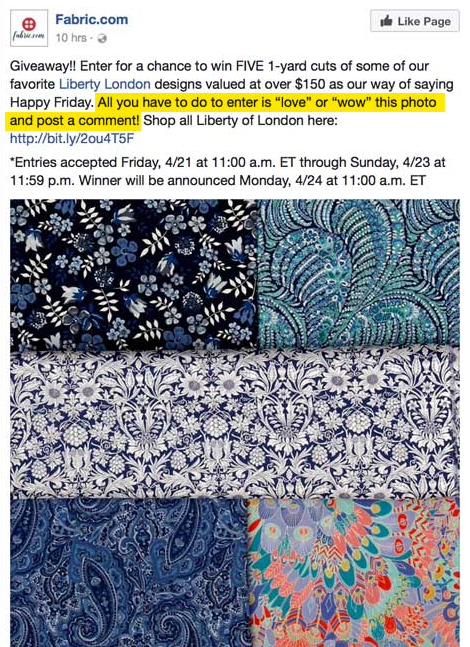
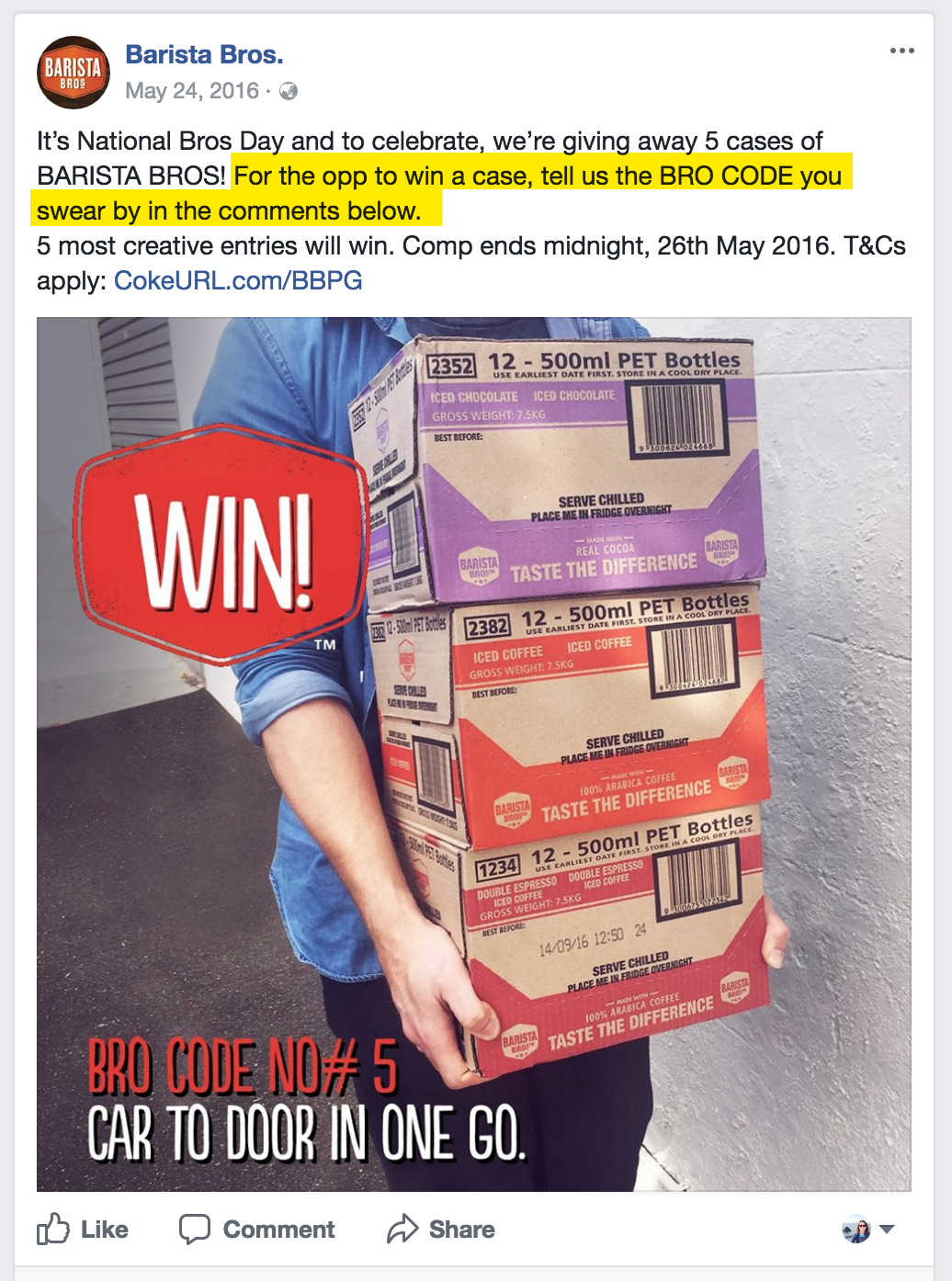
You are allowed to ask users to “like” or “comment” on your post or combine the two together. Quite often businesses will ask users to Like as well as comment to get the maximum effect.
See examples below of what you can ask your fans to do in order to enter your competition.
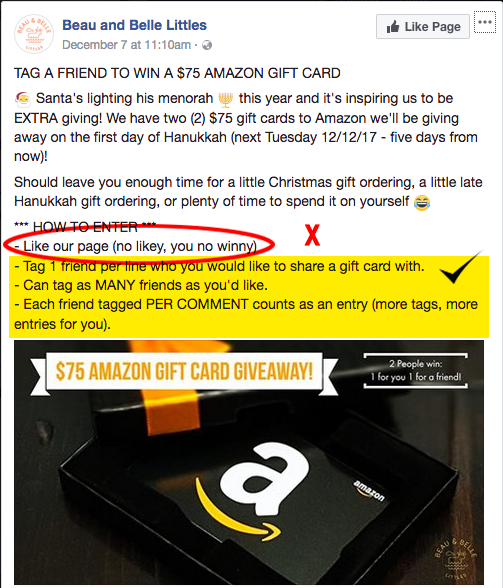
Although you can’t tag a friend as a condition of entry, you could ask your Fans to tag a friend who they would bring if they won a prize that involved someone else, such as a double pass to an event. This example below from Beau and Belle Littles shows how they have violated Facebook guidelines by asking users to like their Page as a condition of entry but also illustrates a clever and approved way to get comments for their giveaway.
After the Contest
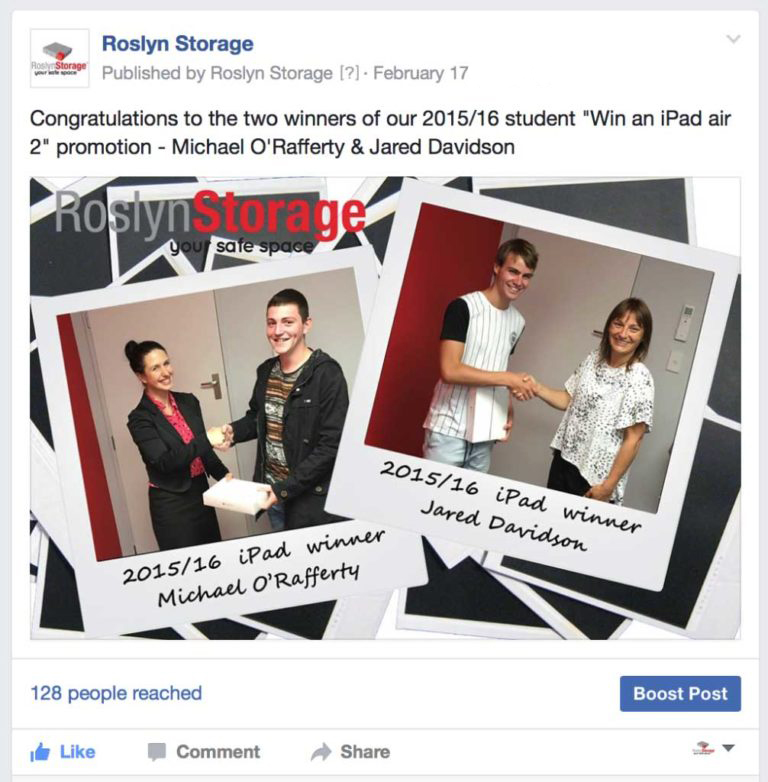
After you have run your contest and the winner has been drawn you may think you are finished but there’s just one thing left to do: Announce (and contact) the winner. To be sure you’ve run your contest within Facebook’s guidelines you must notify your winner before announcing anything on Facebook. The other entrants will be checking your Facebook Page to see if they won or who won. And with Facebook’s update to their promotion guidelines, you can announce contest winners with a Facebook Post. Best practice would be to email the contest winner, then if the winner consents, post a photo of them as a winner on either a blog post or as Facebook post.
Facebook Contest Do’s and Don’ts Summary
YES, you can ask people to do the following as a condition of entry:
- Like a post
- Comment on post
- Answer a question
- Add a photo to a post
- Post on a Page
- Message a Page
- Submit names for a new product
- Tag someone who they would like to bring with them if they won tickets
- Check-in to your business
- Post directly to a Page’s wall
NO, you can’t require people to:
- Share a Page to a user’s personal timeline
- Share a post to a user’s timeline
- Like a Page to enter
- Like a different Page to enter
- Like multiple Pages to enter
- Tag themselves in your post
- Tag other people in your post
What Will Facebook Do?
You may ask “but what will really happen to my Page if I ask users to like my Page to enter?” Maybe not much. However, you might get Facebook’s attention through consistent promotion guideline abuse. If you’re constantly running promotions that ask and incentivise users to tag, like a Page or share a post, you might get in trouble. Plus, if anyone reports your Page then Facebook is immediately alerted to any violations of their guidelines. Anything from a strongly worded message from Facebook itself to punishment of you Page such as:
- suspend fans from liking your page for a certain period of time
- remove the likes that were accumulated over a certain period
- take your page access away
- or completely delete your page
About the Author, Philippa Crick
 Philippa runs Cre8ive Marketing, an advertising, design and digital marketing agency that was originally established in Dunedin in 1978. An experienced Digital Marketing Expert in websites, email marketing, social media and Google Adwords with over 18 years experience across a myriad of sectors. Philippa is also a regular guest speaker at events and marketing trainer for businesses.
When you post updates on your business’s Facebook Page, your followers will potentially see those updates in their News Feeds. Each user’s News Feed is like the front page of a personalised newspaper. It includes recent popular updates both from their personal Facebook friends and from the businesses they follow.
You may think that when you gain a new fan for your business Facebook Page that they will automatically see your posts in their timeline. In fact, they are highly unlikely to see any of your posts. Just because someone has “liked” your page doesn’t mean they’re necessarily going to see your updates when they log onto Facebook. In fact, Facebook says that, on average, only a very small percentage of your fans will see any given update.
Back in 2013 Facebook began this process “Our goal is to show the right content to the right people at the right time so they don’t miss the stories that are important to them. As part of that we want to make sure that the best quality content is being produced, surfaced and shared. Our latest update to the News Feed ranking algorithm helps ensure that the organic content people see from Pages they are connected to is the most interesting to them.”
Facebook has become incredible complex, employing sophisticated algorithms to determine what is quality content. Updates that users have “liked,” shared with their friends, or commented on, will be displayed more often. In other words, the more popular the content is, the more likely your fans will see it.
That’s why your job is not only to post content regularly, but figure out what kinds of updates will get your fans to do something. The more you can inspire your fans to click “Like” on your updates, to leave comments, or to click “Share” to spread your words to their friends, the better your “reach” numbers will be. To show up in as many users’ newsfeeds as possible your content must be fresh, engaging, current and compelling. Then it becomes a cycle; the benefit of having a ‘popular’ post is that your subsequent posts will have an increased likelihood of being shown.
Not all interaction by users is considered equal. Facebook ranks each of the engagement measures with a different weighting.
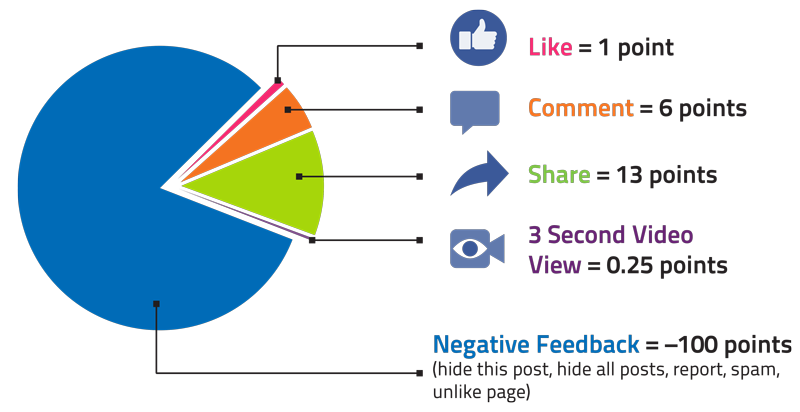
On the other side, if you post low engaging content or worse content that attracts negative feedback such as the user hides the posts, hides all posts or unlikes your Page, this will have a negative impact on your future posts with a lower reach. You need to be regularly checking your engagement in Facebook’s analytics to see what is and what isn’t working.
Detail in Your Facebook Marketing Strategy How to Get Around Declining Organic Reach
Your Page strategy should detail how you are going to produce high quality content and your process for optimising for engagement and reach. Here are some tips to utilise when creating your posts:
- Make your posts timely and relevant (use Facebook Insights to see when your Fans are online)
- Build credibility and trust with your audience
- Ask yourself, “Would people share this with their friends or recommend it to others?”
- Think about, “Would my audience want to see this in their News Feeds?”
- Visual Content is 40 times more likely to be shared on social media channels than non-visual content
- Ask questions with ‘true / false / yes / no’ answers
- Go LIVE – use Facebook’s Live tool as this will have more organic reach than just an image or video linked from Youtube
- Other ideas about how to generate Facebook engagement
Of course, for any important messages – you need to pay.
If you need more assistance with your Facebook strategy and understanding how to get the most out of it, you can join a group training session or have a private training scheduled with an expert in Facebook.
1. Receive Notifications from Competitor Content
It’s vital that Brands measure their efforts against the competition to know what’s working and things that could improve. One way you can do this on Instagram is to track what content your competitors publish on a regular basis. This information can be used as inspiration for future posts.
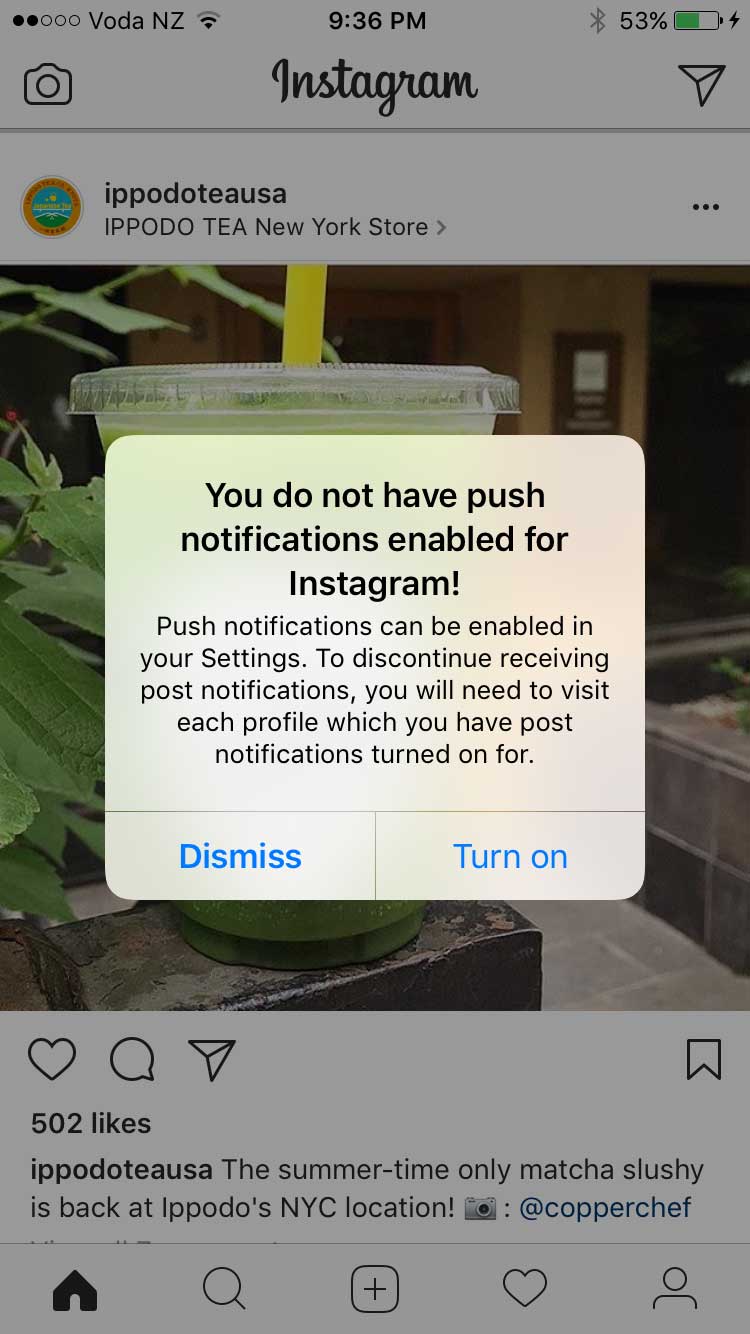
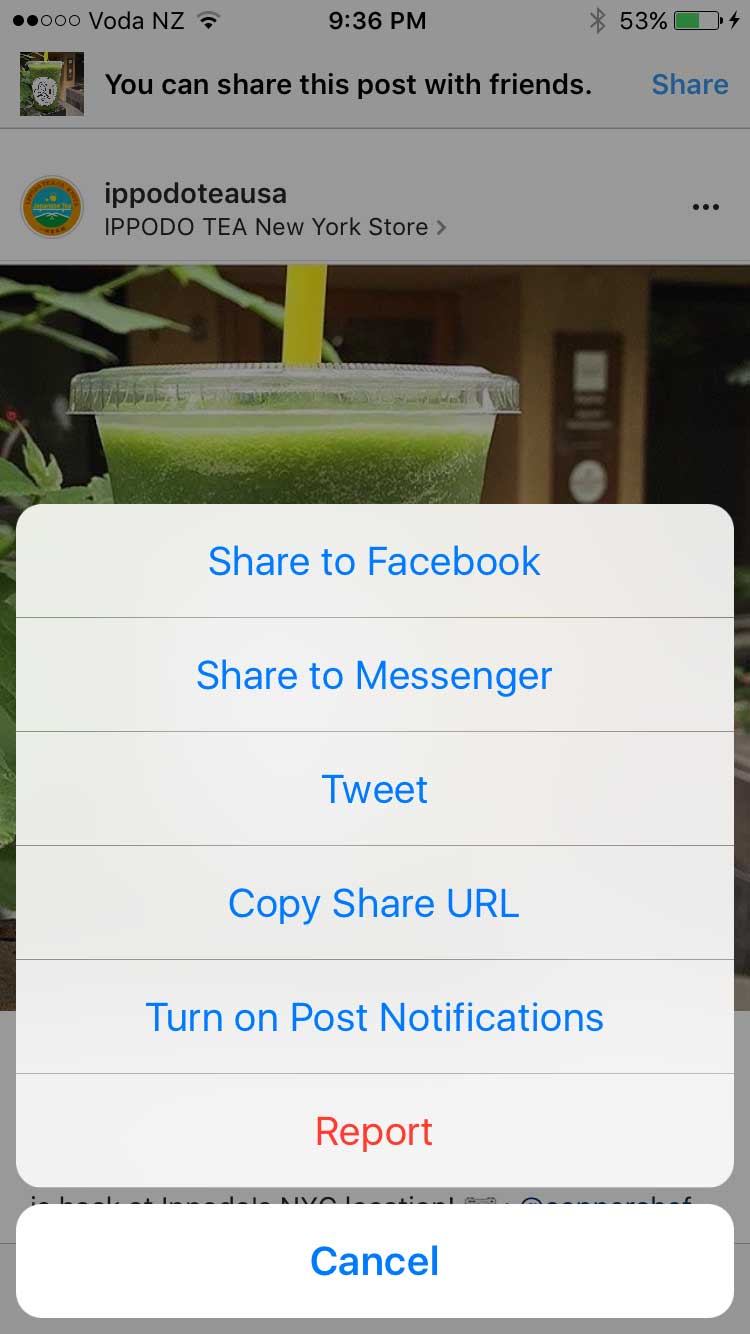
To do this you will first make sure you have Push Notifications enabled for Instagram. Then go to your Instagram and find a post of the Brand you want to track and click on the three dots in the top right hand corner and you will see a list of options – select the last one ‘turn on post notifications’
2. ‘Hide’ Your Hashtags
Every Instagram post you create can be accompanied by a short message or caption and a few hashtags. The hashtags help organise and categorise photos and video content, which aids the process of content discovery and optimisation. It’s better to use the top Instagram hashtags that have an engaging community behind them and are specific to your audience.
Hashtags work well in Instagram – not only do hashtags help spread awareness but they can get your audience engaged. However, some of the general hashtags can be a little boring for users and many brands have simply hidden their unbranded hashtags to avoid taking up too much real estate. Easily hide your additional hashtags by adding a second comment with the tags or by following these steps:
- Click the 123 button on your mobile keyboard (iOS).
- Click return and add either a period, dash or bullet.
- Hit return again and repeat the process a few times to hide your message (Instagram hides after three).
“Posts with at least one Instagram hashtag average 12.6% more engagement than posts without a hashtag”
3. Use Hashtags to Drive Engagement
Instagram hashtags are one of the best ways to grow your Instagram account. Using the right hashtag (or combination of hashtags) can help you expose your brand to large and targeted audiences. In fact, your chances of attracting new followers, getting more likes and increasing engagement are increased by the use of hashtags.
Keep in Mind
· Numbers are allowed in hashtags. However, spaces and special characters, like $ or %, won’t work.
· You can only tag your own posts. You can’t tag other people’s photos/videos.
· You can use up to 30 tags on a post. If you include more than 30 tags on a single photo/video, your comment won’t post.
4. Develop Branded Hashtags
A branded hashtag is a hashtag that’s unique to your business. It can be as simple as your company name, tagline or the name of one of your products or campaigns. Or it can be a hashtag that has nothing to do with your brand name, but has everything to do with your brand identity.
While community hashtags are meant to increase the reach of your message, branded hashtags are designed to connect themes for you and your audience.
A great example is Lululemon’s #thesweatlife
After you tag your post with a hashtag, you’ll be able to tap the hashtag to see a page that shows all photos and videos people have uploaded with that hashtag.
5. Make Your Bio Link Dynamic
You get one clickable link in your Instagram account, but you can change it as many times as you please. Instead of using your home page URL and never touching it again, use the link in your bio to promote your latest content or special promotions.
“Instagram posts with a geotag receive almost 80% more engagement than non-tagged content.”
6. Geotag Content for Higher Engagement
To get your content in front of a larger audience, it’s smart to geotag your images and videos. Users commonly scope tagged locations to follow other people in the same area. By tagging multiple areas with your various content, you spread out your social casting net. But do tag locations where the content belongs.
7. Insert Line Breaks in Your Bio & Captions
Have you ever scrolled through your Instagram feed and noticed a post with an extremely long caption, without any line breaks? Chances are you kept scrolling without giving it a second look.
Hit and then 123 and return button appears!
8. Resize Photos for Instagram
Do you have a photo that you took a while back that would be perfect for Instagram? Don’t just rush to post it. First, make sure that it’s sized and correctly cropped. You can do this manually by cropping your pictures to fit Instagram’s dimensions, but a better solution is to use Landscape.
Landscape is a free tool that resizes your photos to fit perfectly on Instagram and other social networks.